Useful for a supplied skill roster
- Tasks with clear procedures and explicit prerequisites.
- Catalogs where similar names hide different capabilities.
- Inspecting a fixed instruction handoff before writing a loader.
Jev skill selection matches a task to the procedures you actually supply. Compare similar requests, keep a no-match option, and preview the selected instructions.
Jev skill selection matches the work requested to a procedure in a supplied catalog. In this example, the catalog contains an existing-slide editor, a CSV quality reviewer and a test debugger. The model chooses one label, or says that no skill matches or the task needs more context. The downloaded consumer then previews the instructions associated with that label.
The distinction between editing a deck and creating one matters here. The catalog has an editor that requires an existing PPTX. Asking for a new investor presentation does not make an authoring skill appear. Likewise, explaining the initials CSV is different from inspecting supplied rows. Both examples share vocabulary with a listed skill while falling outside its stated procedure.
This exercise was inspired by an API-collected X post about Jev Skill Suggestion for Claude Code. The official TypeSafe cookbook and the maintainer implementation describe a larger selection process, including shortlist verification. Our window demonstrates one closed Choice over three synthetic descriptions. The tasks and preview instructions are original; the page does not install that plugin, reproduce its catalog or measure context savings.
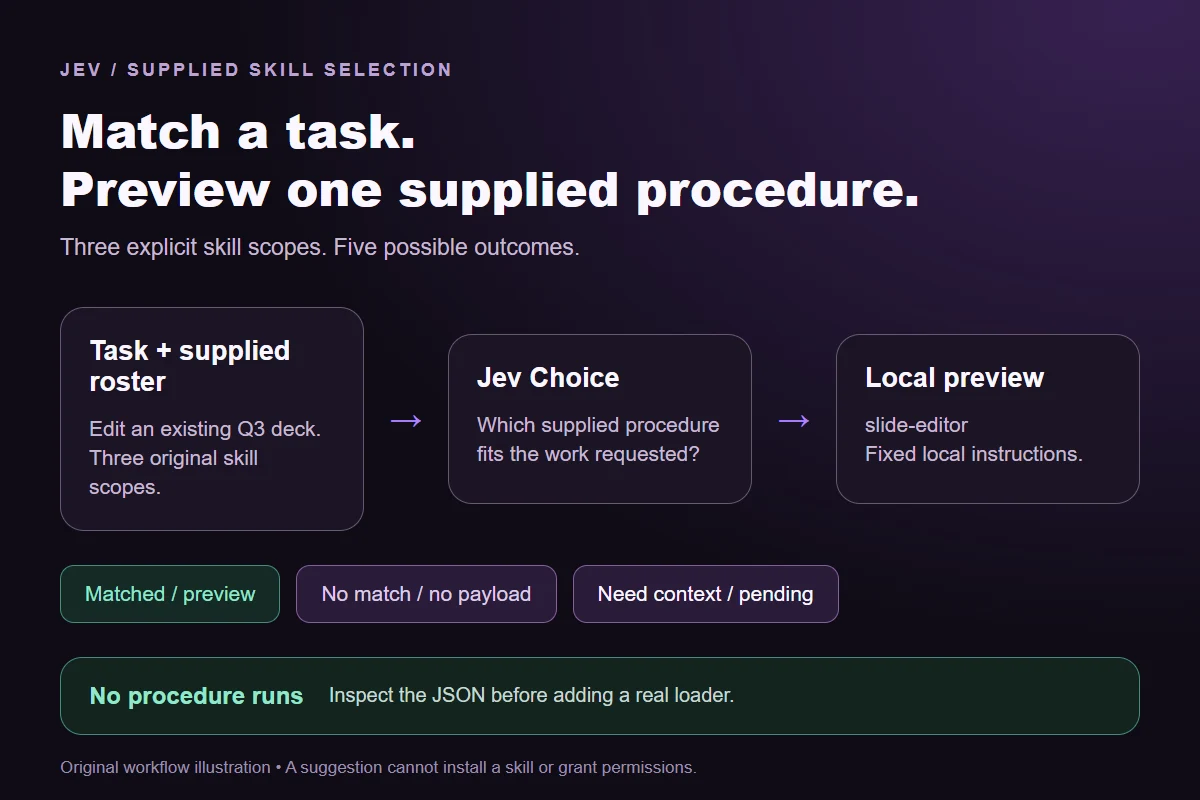
Keep the procedure scope visible so a matching word cannot stand in for a matching task.
Write what each skill does and what it requires. Edit slides requires an existing deck. The CSV reviewer works on supplied data. These descriptions are part of the evidence, not inferred from the label.
Say what needs to change or be investigated. A request can mention a file format without asking for that procedure. The model sees only the task and catalog supplied in this window.
Read the full distribution across five outcomes. No matching skill preserves a complete but unsupported request. Need more context preserves an underspecified request. An API failure supplies neither outcome.
Run the offline consumer against the exact saved observations. A matched outcome selects a fixed instruction payload. Nothing is installed, no file is opened and no procedure is executed.
| Original task | Observed label | Leading probability |
|---|---|---|
| Edit an existing deck | Edit slides | 93% |
| Inspect CSV rows | Inspect CSV | 99% |
| Investigate a failed test | Debug tests | 99% |
| Explain a file format | No matching skill | 100% |
| Create a new deck | No matching skill | 100% |
| Unspecified work | Need more context | 100% |
6 actual Jev API calls on October 1, 2026. Original synthetic inputs check this rubric and handoff; they do not establish held-out accuracy. Probabilities are model outputs.Verified
Download samples.json to inspect the complete question, option labels and task strings. Each record includes the three supplied skill scopes. The expected label is an editorial check of the fixture, not part of the request sent to Jev. The saved-api-results.json file contains the actual observations after testing, including the full probabilities and request hash. You can inspect where an observation agrees with the written rule without treating six examples as a general accuracy score.
The single-request JavaScript runner accepts a sample ID. Choose new-deck to test an unsupported procedure or slides to test a supplied one. It makes one Jev request with no retry and reads TYPESAFE_API_KEY from your process environment. The fixture holds no key. A replay is a new observation and can differ from the recorded call; keep the response rather than copying a preferred result back into the test table.
The shared Python preview consumer takes the fixture and saved observations as separate files. It requires one observation per sample, matches the sample IDs, and recomputes the request hash. If you edit the task or change a procedure description, an older answer is stale for that request. The consumer rejects it rather than letting a decision about one catalog select instructions from another. Changed rubrics and option labels also need matching observations.
For Edit slides, Inspect CSV or Debug tests, the output contains the corresponding fixed skill ID and short original instructions from the fixture. Those instructions are copied as data; Jev does not write them. No matching skill produces no payload. Need more context produces a pending request for task details. Tied leading probabilities also remain pending for review. The consumer prints this handoff as JSON and performs no action.
You can use that JSON to inspect an integration boundary before adding an actual loader. A real loader needs its own installed-skill inventory, version checks and permitted file access. An instruction suggestion alone cannot establish that a procedure is installed, that its files are current, or that the caller is allowed to execute it. Keep those checks in application code and treat the original fixture as a small reproducible exercise.
For a useful follow-up test, keep the catalog unchanged and rewrite the new-deck task to request an edit to a supplied file. That changes the task evidence. Then try replacing the edit-only scope with a procedure that genuinely authors decks. That changes the candidate evidence. Separate these experiments so a change in the result has a specific explanation; record the exact request for each run.
Compare project-rule applicability
npm install @typesafe-ai/[email protected]
# Set TYPESAFE_API_KEY privately in your shell.
node run-choice-sample.mjs samples.json new-deck
python preview_choice_workflow.py samples.json saved-api-results.jsonKeep relevance, compliance and execution separate.
The supplied slide procedure edits an existing PPTX and explicitly excludes authoring a new deck. Its name does not override that scope. A production catalog can include a separate authoring procedure, but this fixture cannot assume one exists. The sample tests an ordinary catalog gap rather than a model failure.
This window asks for one procedure for one task. If a task requires a CSV inspection followed by slide editing, split the work into explicit stages or supply a different multi-skill contract. A single winning label cannot describe the whole sequence. The original source cookbook has its own selection and verification process; this fixture does not reproduce it.
No. It says the supplied description fits the supplied request. The model does not inspect an installed SKILL.md, test the procedure or confirm its prerequisites. The offline payload is deliberately small and synthetic. Verify the installed procedure and the required data before executing anything.
No matching skill is appropriate when the request is clear but none of the listed procedures covers it, such as explaining CSV without inspecting data. Need more context applies when work is requested but the task is unspecified. A provider error or malformed response is an operational failure; it should not be converted into either semantic label.
They check this stated rubric and the request-to-preview handoff. They do not cover a real installed catalog, multiple stages or a held-out task set. Test a fresh set you have judged separately before relying on the selector. Keep disagreements and no-match examples, especially for procedures with overlapping descriptions.
Change the supplied evidence here, or use Playground to design another bounded decision.