Jev project rule selection

Jev project rule selection. Load the instructions that apply.

Jev project rule selection compares a task and changed file with a supplied rule scope. Edit the evidence, test the three outcomes, and replay the original requests.

Does this task need the candidate rule?Live API
Try an example

Original synthetic task. Edit the task, path or rule scope to make a fresh API request.

Source: Workflow inspiration on X. Our tasks, rule descriptions and preview consumer are original. This demo does not install or reproduce the jev-rules plugin.

Apply ruleSkip ruleMissing context
A real response from the Jev API

Edit any input to explore a different decision. No request is sent until you run it.

Your next decision

Not run yet

Choose an example or write your own input, then run it to see the ranked choices.

Results are not stored by this site. Your submitted text is processed by the API provider.

The decision

How does Jev project rule selection work?

Jev project rule selection checks whether a supplied instruction belongs in the current task context. The model reads the task, an optional changed-file path and one rule description. It returns Apply rule, Skip rule or Missing context. The page evaluates applicability; it does not inspect the repository or determine whether an edit follows the rule.

A checkout calculation needs payment instructions even when the request says only 'fix the bug.' A changed path such as src/checkout/discount.ts supplies evidence that the vague request lacks. Conversely, building a production bundle on a laptop does not mean deploying it. A release rule that excludes local builds should stay out of that task.

The source is Elia Alberti's post about jev-rules, a plugin that supplies relevant project context. We built an independent exercise with synthetic tasks and a preview-only consumer. The maintainer's implementation uses its own questions, hooks and delivery policy. This page does not install that plugin, reproduce its measurements or claim that selecting instructions enforces them.

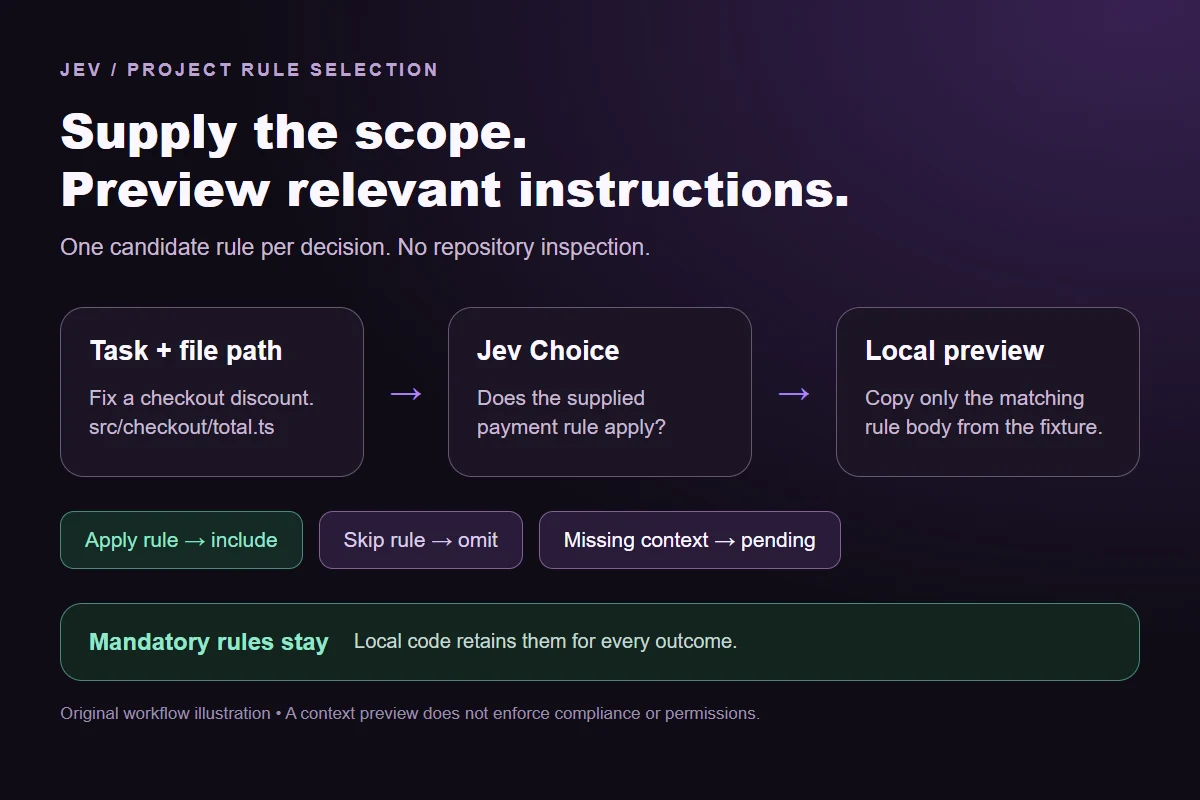
Jev project rule selection workflow from task and file evidence to optional instruction context, with mandatory rules retained locally.
Original workflow diagram. The optional decision selects context; mandatory instructions remain a local code rule.
How it works

Select relevant instructions in four steps.

Start with an explicit scope, then inspect the actual decision before delivering context.

  1. Describe when the rule applies

    Name the work covered by the instruction and any important exclusion. A deployment rule should say whether local builds count; 'release-related work' leaves that distinction unresolved.

  2. Supply the task and changed path

    Use a synthetic task or content your organization permits sending. A path can help classify an edit, but it does not reveal what the file contains.

  3. Compare the returned options

    Keep all three probabilities. Missing context asks for better evidence. Apply rule says the instruction is relevant, not that the proposed change complies with it.

  4. Preview the local rule body

    The downloadable consumer copies a selected rule body verbatim into a preview. It retains mandatory context and pending decisions. It never edits a file or executes a deployment.

Our API test

What the six original tasks returned.

What the six original tasks returned.
Original taskObserved labelLeading probability
Checkout changeApply rule100%
Local buildSkip rule100%
Actual releaseApply rule99%
Vague task, useful pathApply rule97%
Documentation onlySkip rule100%
No task or pathMissing context100%
  • Measured adapter round trips: 505-1279 ms. Input tokens: 541-562 per request. Estimated input cost: $0.00002272-$0.00002360 per request; these observations are not a latency guarantee.

Six actual Jev API calls on October 1, 2026. These synthetic cases check this rubric; they are not a held-out accuracy benchmark. Probabilities are model outputs, not compliance scores.Verified

Worked example

How can you replay and deliver the selected context?

Download rule-samples.json for the exact request strings and original rule bodies. Each sample binds one rule ID to its task. That binding is important: an answer about the payment rule must not deliver the deployment instructions. The consumer checks sample IDs and uses only rule bodies already present in the local fixture. It does not use a model-produced path to open arbitrary files.

The single-call SDK runner sends the same context, question and option labels as the browser demo. Select one sample ID so a replay makes one request rather than silently processing every fixture. The runner reads TYPESAFE_API_KEY from the process environment. Set it in a local shell or private environment file; do not add the key to the fixture, URL or browser code.

After testing, saved-api-results.json records the actual labels, full distributions and measured request metrics. Run the offline consumer against that saved file to preview which rule bodies would be delivered. Apply rule copies the body. Skip rule leaves optional context out. Missing context records the unresolved rule. A mandatory fixture rule is added independently of every optional model answer.

You can also supply a newly captured result file. Keep it paired with the exact fixture version that produced the request. If the task, description or changed path changes, the older applicability result no longer establishes relevance for the edited request. Archive the raw distribution and request identity alongside any preview so a later reviewer can distinguish a new call from a saved observation.

This small consumer has no session cache, agent hook or file watcher. It demonstrates one explicit input-to-context handoff. A production integration needs its own rules for stale results, changed descriptions, repeated context and failures. Loading a rule body is advisory context; repository tests and permission checks still decide what an application may execute.

Downloads: exact sample requests, saved API results, single-request SDK runner and offline context preview. For a different question, compare the code guideline check or read the Jev model overview.
Runnable offline example

Replay one task, then inspect the saved context.

Replay commands
npm install @typesafe-ai/[email protected]
# Set TYPESAFE_API_KEY privately in your shell.
node run-choice-sample.mjs rule-samples.json checkout
python build-rule-context.py rule-samples.json saved-api-results.json
Scope of this demo

Where does rule selection help?

Useful for optional task context

  • Projects with specific instructions that apply to different kinds of work.
  • Tasks where a changed path adds evidence missing from a short request.
  • Previewing rule applicability before building a larger hook integration.

Needs a separate check

  • Permission enforcement, release approval or deciding whether code satisfies a rule.
  • Tasks whose relevant files or dependencies are not supplied.
  • Mandatory policies that must remain present regardless of a model response.
Example FAQ

Questions about selecting project rules.

Keep relevance, compliance and execution separate.

Can several rules apply to one task?

Yes. This window evaluates one candidate at a time so its evidence and options remain easy to inspect. A larger integration can ask one applicability question per rule and retain every relevant instruction. A single winner across the entire rule library would discard valid overlapping instructions. Do not confuse one outcome for a candidate with a requirement to choose only one rule.

What if the task is vague but the file path is specific?

The path can supply useful evidence. The file-context sample names a checkout file even though its task text is vague. The model still cannot see that file's contents, imports or callers. If a generic path does not establish the rule's scope, keep Missing context available and ask for the affected area rather than making the path stand in for a code review.

Does a high probability mean the rule was followed?

No. The question asks whether the rule applies. A strong Apply rule result says the task needs that context. Checking an edit against the instruction is a separate judgment with different evidence. Use the code-guideline example when you want to inspect compliance with a visible rule, and use ordinary tests for properties that code can verify exactly.

What should happen if the API cannot answer?

An API error is different from Missing context. The latter is a valid answer about incomplete evidence; an error provides no current applicability judgment. This runner stops without retrying. Before connecting an agent, decide how optional context should be delivered during an outage and retain mandatory policies independently. Record the failed attempt instead of presenting a cached answer as a fresh response.

Are the saved results guaranteed to repeat?

No. They record the exact synthetic inputs and the model used for this run. Editing a task, changing a rule description or using a later model can change the distribution. The sample set exercises intended distinctions but is too small to estimate production accuracy. Test your own positive cases, near misses and missing-context examples before using the selection in a real workflow.

Try a different instruction scope

Edit this example or write another Choice question in the Playground.