Jev finding evidence review

Check the observations behind a security finding

Provide the security claim and test notes. Distinguish an observed unauthorized effect from a prevented attempt or a claim that still lacks matching evidence.

Read the observation before the conclusion.Live API
Try an example

Original synthetic input. Edit the task or evidence to make a new API request.

Source: Workflow inspiration on X

Source and example scope

The inputs, rubric and preview are original. This window demonstrates the stated decision only; it does not reproduce the source application or its measurements.

Review the security claim against supplied test notes.

Decision rules and labels
Observed effectAttempt failedNeed evidence
A real response from the Jev API

Edit any input to explore a different decision. No request is sent until you run it.

Your next decision

Not run yet

Choose an example or write your own input, then run it to see the ranked choices.

Results are not stored by this site. Your submitted text is processed by the API provider.

The decision

How does Jev finding evidence review use the supplied evidence?

Jev finding evidence review labels the evidence status of one claimed security effect. Supply a claim and the observations from a test, then compare the returned distribution across observed effect, failed attempt and missing evidence. The result creates a pending local review packet; it does not confirm a vulnerability or execute a probe.

The distinction depends on what happened in the supplied test. An invoice response matters only when the account ownership and returned content support the cross-account claim. A successful help-page response says nothing about invoice access. A scanner warning provides a hypothesis to investigate, while a completed denial supplies evidence about the attempted effect.

The workflow was inspired by an API-collected post about a Jev decision layer in a penetration-testing harness. Its primary paper describes finding adjudication from supplied evidence. This page implements an independent text-evidence demonstration with synthetic accounts and observations. It borrows neither the paper's benchmark nor its production harness.

Paste a concise report into the hero window or choose one of the six original inputs. Keep the claim, test identity and observed result together. For a real integration, code must preserve captured receipts, enforce scope and verify deterministic facts before a semantic judgment reaches a reviewer. A high leading probability cannot replace those controls.
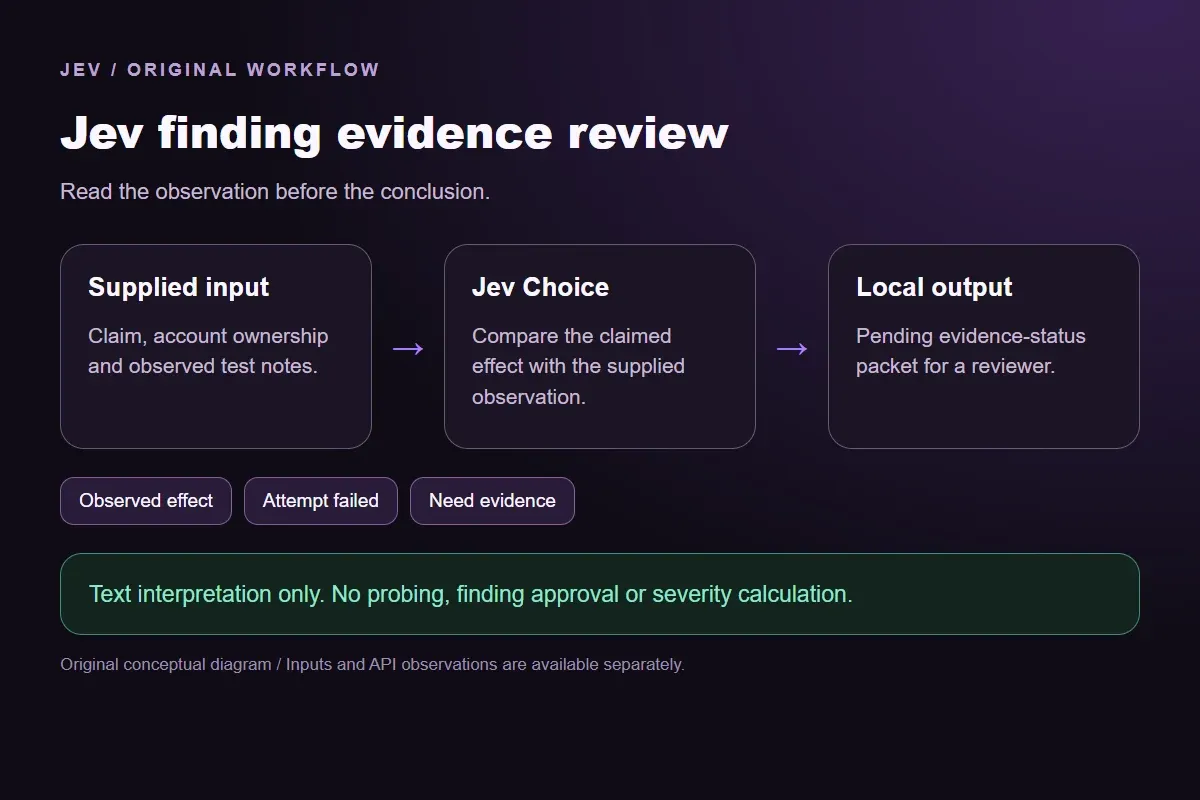

Original Jev finding evidence review workflow diagram showing supplied evidence, a typed decision and the local preview.
Original workflow illustration. The output is a local preview, not an executed action or source screenshot.
How it works

Try the example in four steps

Use the sample to understand the rule, then test your own input for security finding evidence.

  1. Illustration of adding the text or evidence for a decision

    Add the information to check

    Provide the security claim and test notes.

  2. Illustration of defining a question and its allowed choices

    Confirm the question and labels

    Open the decision rules and keep the intended distinction between Observed effect, Attempt failed, Need evidence. Edit the choices only when testing your own rule.

  3. Illustration of sending one input and comparing the returned choices

    Run the decision

    Use a sample first, then try your own input. Compare the selected label with the other returned probabilities.

  4. Illustration of reviewing a result and an uncertain item before using it

    Review the next step

    Review Need evidence before using a result. The label is a decision about the supplied information, not an executed action.

Our API test

What the six original inputs returned.

What the six original inputs returned.
Original test inputFixture expectationObserved labelLeading probability
A record from another accountObserved effectObserved effect92%
The same request was deniedAttempt failedAttempt failed99%
A scanner label without an observationNeed evidenceNeed evidence100%
A public page returned successfullyNeed evidenceNeed evidence100%
Submitted markup displayed as plain textAttempt failedAttempt failed97%
A conclusion without its evidenceNeed evidenceNeed evidence98%
  • 6 of 6 original fixture expectations matched. Contrary outputs are preserved in the table and downloads; these checks are not held-out accuracy or production suitability.
  • Measured adapter round trips: 454-1165 ms. Estimated input cost: $0.00002230-$0.00002323 per request. These observations are not a latency guarantee or invoice.

6 actual Jev API calls on October 4, 2026. Original synthetic inputs check this rubric and handoff; they do not establish held-out accuracy. Probabilities are model outputs.Verified

Understand the results

A record from another account

The first input includes both account ownership and the observed invoice content.

Read the example notes

Those facts connect the test to the precise unauthorized-read claim. The fixture expectation is Observed effect because the described response contains the other account's information. The sample is invented for this demonstration; it is not a report about a real service. The local packet records the semantic label and waits for an analyst to examine the actual capture.

The same request was denied

The second input changes the observation while keeping the claim and account relationship.

Read the example notes

The request was completed, the response denied access and no invoice content appeared. Attempt failed describes this one attempt. It does not mean the endpoint has no vulnerabilities or that other users and routes are safe. Preserve the denial in the same evidence packet rather than rewriting it as an untested security conclusion.

The scanner input offers a possible issue without a corresponding request or response

The scanner input offers a possible issue without a corresponding request or response.

Read the example notes

Need evidence preserves that gap. A scanner name, risk adjective or confident summary does not establish that another account's invoice was returned. An analyst can add a captured test result to a new request later. The original missing-evidence response remains available, so the article does not disguise an initial hypothesis as a reproduced finding.

The public-help input is a useful negative control

The public-help input is a useful negative control.

Read the example notes

Its successful response belongs to another route and carries no private invoice. The correct task is to judge whether this evidence demonstrates the stated effect, rather than classify every successful response as exploitation. In an integration, keep endpoint identity beside the narrative and retain the capture independently of the model response. This sample supplies only the written observations shown in its editable context.

Observed escaped markup without script execution

The markup input has a completed browser observation: submitted markup appeared as escaped text and no script ran.

Read the example notes

Attempt failed is limited to that supplied test. The model is not asked to generate markup, find a bypass or simulate a browser. If the observer had recorded only a screenshot with uncertain behavior, the evidence would be incomplete. Real browser logs and any deterministic validator verdict belong in the analyst's record.

The password-reset input contains a security conclusion without an old-session check

The password-reset input contains a security conclusion without an old-session check.

Read the example notes

Need evidence keeps the unobserved session state unresolved. A password reset and session revocation are different events; the report must describe the relevant observation before the claimed effect can be evaluated. Edit the input to include the old session's actual result if you have it, then send a new API request. Replaying the original response would still describe the original incomplete evidence.

Source and example scope

Fixture expectations are authored before the calls. Any contrary model choice remains visible beside its expectation and complete distribution; no repeated judgment is used to obtain a preferred label.

Using the result in your application

Download the exact sample requests and saved observations below.

Read the example notes

Expected labels are original fixture checks and stay outside the request sent to Jev. The observation file preserves the complete probabilities and the hash of each exact request. Editing a task, rubric or candidate requires a fresh response; a matching sample name does not make an older answer current.

Using the result in your application

The JavaScript runner makes one independent SDK request for a chosen sample ID.

Read the example notes

It reads TYPESAFE_API_KEY privately from the environment and has no automatic retry. The Python consumer operates offline: it checks the rubric, labels, unique sample identities, request hashes and valid probability distributions before selecting a fixed local preview. A tied leading result remains pending for review.

Source and example scope

The page reports measured adapter round trips and estimated input cost for the recorded calls.

Read the example notes

Those values describe these requests, not a provider latency guarantee or a billing statement. Six deliberately authored fixtures can check the stated behavior, but they do not establish accuracy on an unseen dataset. Keep disagreements and missing-input examples when testing an integration.

Runnable offline example

Replay one request and inspect the saved preview.

View the code example
Replay commands
npm install @typesafe-ai/sdk@0.6.0
# Set TYPESAFE_API_KEY privately in your shell.
node run-choice-sample.mjs samples.json cross-account-record
python preview_choice_workflow_v2.py samples.json saved-api-results.json
Runnable offline example

The first input and its recorded local output.

View the code example
Observed local packet
{
  "input": {
    "task": "Claim: a signed-in user can read another account invoice. Test notes: in our synthetic test, user Mira owns invoice A. Mira requested invoice B owned by Noor; the response contained Noor's invoice number and address. Ownership was checked in the supplied fixture manifest."
  },
  "recordedLocalOutput": {
    "sampleId": "cross-account-record",
    "leaders": [
      "Observed effect"
    ],
    "probabilities": {
      "Observed effect": 0.92,
      "Attempt failed": 0.01,
      "Need evidence": 0.07
    },
    "action": "preview_finding_evidence",
    "payload": {
      "evidenceStatus": "Observed effect",
      "findingApproved": false
    },
    "pending": true
  }
}
Scope of this demo

Where does this decision fit?

Useful with explicit supplied evidence

  • Interpret a security claim against its supplied test observations, separating a described observed effect, a completed failed attempt and evidence not supplied; print a pending local evidence-status packet. No probing, finding approval or severity calculation.
  • Inspecting the original task and a fixed output before integrating external tools.
  • Comparing an explicit expected label with the complete recorded distribution.

Needs separate implementation or evidence

  • Inferring facts absent from the supplied input.
  • Treating a semantic selection as authorization to act.
  • Executing an external action or generalizing six fixtures into an accuracy claim.
Example FAQ

Questions about this original decision workflow.

Inspect the test notes and keep the evidence gap visible.

Does Observed effect confirm a real vulnerability?

It describes what the supplied notes say happened. This window has no live target, capture verifier or authorization system. Its synthetic inputs and pending local output support a demonstration of evidence interpretation. An analyst still needs to check the actual receipts, account relationships, scope and applicable deterministic validations.

Why is a scanner warning different from a failed attempt?

A scanner warning describes a possible issue. A failed attempt includes a completed relevant test whose observation prevents the claimed effect. Keeping those states separate helps a reviewer see whether a test exists at all. Neither label establishes the security of other routes or future requests.

Can I use my own captured notes?

Yes. Replace the editable context with a concise claim and relevant observations, then send a fresh request. Remove credentials and personal information before using this public demo. The API sees the supplied text and declared rule, so omitted capture details remain unavailable. The result is an interpretation for review.

Does the page reproduce the source paper?

No. The linked primary paper motivates evidence-based finding adjudication in a larger harness. This page uses its own synthetic fixtures, one narrow Choice question and a local preview. The six observations are functional checks of this contract; they do not reproduce the paper's study, calibration or reported performance.

Try a task from your own workflow

Change the supplied task or evidence here, then inspect the live response. Playground supports another explicit decision.


