Jev enum tool selection

Match a request to a permitted tool configuration

Compare the task with supplied status and item-list configurations. Select only a supported fixed configuration or preserve missing context; the example neither invents arguments nor calls the tool.

Pick a call with its arguments already defined.Live API
Try an example

Original synthetic input. Edit the task or evidence to make a new API request.

Source: Workflow inspiration on X

Source and example scope

The inputs, rubric and preview are original. This window demonstrates the stated decision only; it does not reproduce the source application or its measurements.

Which supplied permitted tool configuration fits the requested task?

Decision rules and labels
Inspect statusList open itemsList closed itemsUnsupported inputNeed more context
A real response from the Jev API

Edit any input to explore a different decision. No request is sent until you run it.

Your next decision

Not run yet

Choose an example or write your own input, then run it to see the ranked choices.

Results are not stored by this site. Your submitted text is processed by the API provider.

The decision

How does Jev enum tool selection use the supplied evidence?

Jev enum tool selection picks a complete candidate call for a task. Our inventory contains an argument-free status inspection and two versions of list_items: kind open or kind closed. Selecting List closed items therefore identifies both the tool and its permitted argument. The model never has to invent an object or guess another enum value.

A tool description and a parameter schema answer different questions. The description explains what a tool does. The schema constrains the shape of its arguments. A perfectly shaped list_items call can still serve the wrong task, such as returning open items when the user asked for resolved ones. This exercise puts the semantic choice after a small inventory of complete local candidates.

The workflow came from an API-collected X discussion of deterministic schema checks before Jev tool selection. We also read the maintainer's WebMCP extension example, which maps enumerable inputs into typed questions. Our demo supplies three fixed calls rather than inspecting a live browser registry. It does not implement the extension, enumerate arbitrary JSON Schema or claim support for every parameter type.
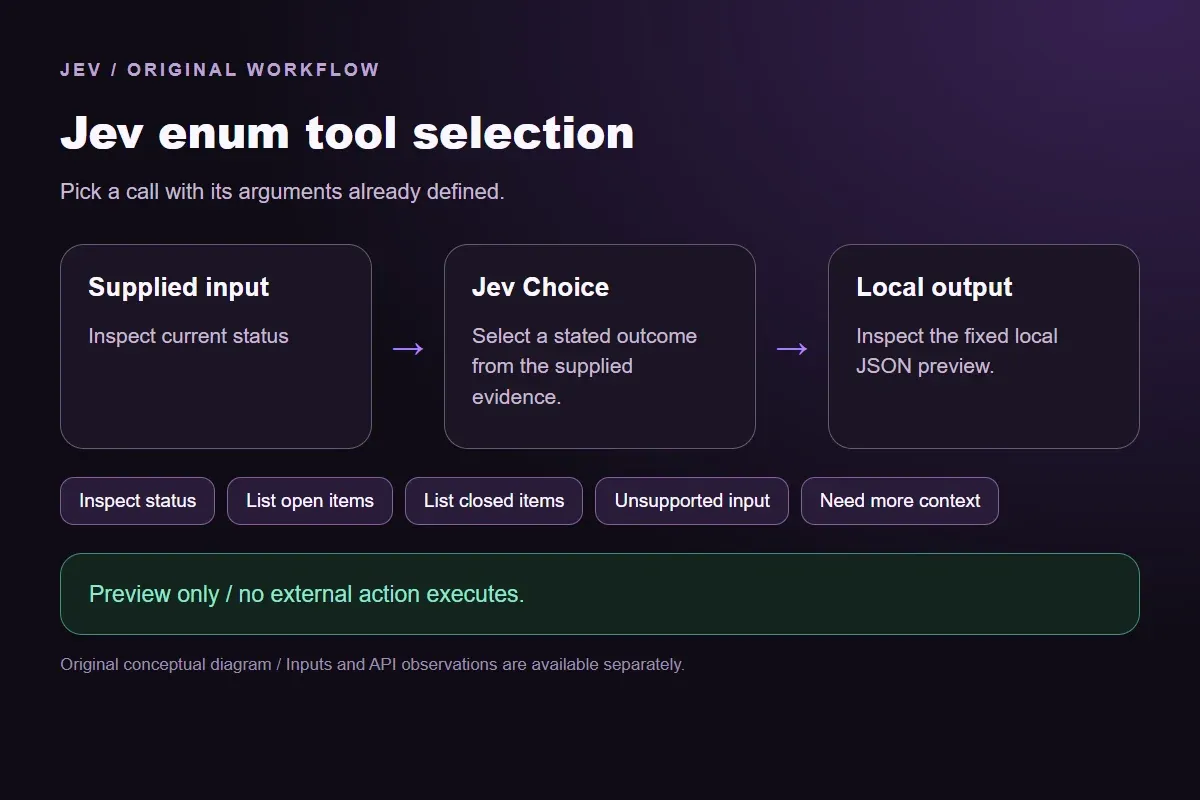

Original Jev enum tool selection workflow diagram showing supplied evidence, a typed decision and the local preview.
Original workflow illustration. The output is a local preview, not an executed action or source screenshot.
How it works

Try the example in four steps

Use the sample to understand the rule, then test your own input for tool configuration matching.

  1. Illustration of adding the text or evidence for a decision

    Add the information to check

    Compare the task with supplied status and item-list configurations.

  2. Illustration of defining a question and its allowed choices

    Confirm the question and labels

    Open the decision rules and keep the intended distinction between Inspect status, List open items, List closed items, Unsupported input, Need more context. Edit the choices only when testing your own rule.

  3. Illustration of sending one input and comparing the returned choices

    Run the decision

    Use a sample first, then try your own input. Compare the selected label with the other returned probabilities.

  4. Illustration of reviewing a result and an uncertain item before using it

    Review the next step

    Review Need more context before using a result. The label is a decision about the supplied information, not an executed action.

Our API test

What the six original inputs returned.

What the six original inputs returned.
Original test inputObserved labelLeading probability
Inspect current statusInspect status100%
List unresolved itemsList open items100%
List resolved itemsList closed items100%
Request an unavailable changeUnsupported input94%
Missing item kindNeed more context87%
Request unsupported free textUnsupported input81%
  • Measured adapter round trips: 485-1261 ms. Estimated input cost: $0.00002629-$0.00002680 per request. These observations are not a latency guarantee or invoice.

6 actual Jev API calls on October 1, 2026. Original synthetic inputs check this rubric and handoff; they do not establish held-out accuracy. Probabilities are model outputs.Verified

Understand the results

The status request is a zero-argument example

The status request is a zero-argument example.

Read the example notes

The open and closed requests differ only in what the user wants listed, so they help expose a choice that follows the task rather than defaulting to one configuration. The unavailable deletion request has no permitted write candidate. Keeping Unsupported input available prevents a status inspection from masquerading as a deletion.

The missing-kind sample needs a question back to the user

The missing-kind sample needs a question back to the user.

Read the example notes

Listing all items is not one of the offered configurations, and quietly choosing open changes the request. The free-text sample is different: it is clear, but the supplied list_items contract has no search argument. Adding a phrase to that call would create an input outside this fixture's inventory.

The question's order separates those cases

The question's order separates those cases.

Read the example notes

A specified action that requires an unavailable tool or invented parameter is unsupported. A task whose necessary selection is absent needs more context. Neither label means the provider failed. A network error supplies no semantic judgment and belongs in a separate operational error path.

Request an unavailable change

To try a useful revision, change the task from unresolved items to resolved items while leaving the inventory alone.

Read the example notes

That should make the closed configuration more relevant. A second experiment could add a real search tool with a documented argument contract. Treat that as a new inventory and record a new observation; it cannot retroactively justify the earlier free-text request.

Using the result in your application

In a real dispatcher, check the current tool registration and validate the selected arguments again before execution.

Read the example notes

The tool might have been renamed, disabled or scoped to a different account since the model call. The fixture's stable labels and request hash help inspect a preview, but they do not establish authorization to access another service.

A finite inventory gets larger as enum values and optional settings multiply

A finite inventory gets larger as enum values and optional settings multiply.

Read the example notes

This three-call example does not measure that growth. A larger integration can split a decision into a tool choice and parameter questions, with explicit missing-input behavior. Preserve the contract at each stage and test tasks that mention similar tools but require different arguments.

Using the result in your application

Download the exact sample requests and saved observations below.

Read the example notes

Expected labels are original fixture checks and stay outside the request sent to Jev. The observation file preserves the complete probabilities and the hash of each exact request. Editing a task, rubric or candidate requires a fresh response; a matching sample name does not make an older answer current.

Using the result in your application

The JavaScript runner makes one independent SDK request for a chosen sample ID.

Read the example notes

It reads TYPESAFE_API_KEY privately from the environment and has no automatic retry. The Python consumer operates offline: it checks the rubric, labels, unique sample identities, request hashes and valid probability distributions before selecting a fixed local preview. A tied leading result remains pending for review.

Source and example scope

The page reports measured adapter round trips and estimated input cost for the recorded calls.

Read the example notes

Those values describe these requests, not a provider latency guarantee or a billing statement. Six deliberately authored fixtures can check the stated behavior, but they do not establish accuracy on an unseen dataset. Keep disagreements and missing-input examples when testing an integration.

Runnable offline example

Replay one request and inspect the saved preview.

View the code example
Replay commands
npm install @typesafe-ai/sdk@0.6.0
# Set TYPESAFE_API_KEY privately in your shell.
node run-choice-sample.mjs samples.json status
python preview_choice_workflow_v2.py samples.json saved-api-results.json
Scope of this demo

Where does this decision fit?

Useful with explicit supplied evidence

  • Select one fully specified permitted tool call from a finite local inventory. The fixture supplies fixed tool names and enum arguments; Jev selects a label, while local code preserves the exact payload. Free text and missing arguments are separate outcomes. No tool executes.
  • Inspecting the original task and a fixed output before integrating external tools.
  • Comparing an explicit expected label with the complete recorded distribution.

Needs separate implementation or evidence

  • Inferring facts absent from the supplied input.
  • Treating a semantic selection as authorization to act.
  • Executing an external action or generalizing six fixtures into an accuracy claim.
Example FAQ

Questions about this original decision workflow.

Keep relevance, compliance and execution separate.

Does Jev generate tool arguments here?

No. Each matched label maps to an original fixed object containing a tool name and its arguments. The consumer copies that object after checking the request. The live window returns a decision distribution; it does not execute a call or create a new parameter.

Why include a zero-argument configuration?

It makes the inventory's difference visible. inspect_status needs no arguments, while list_items requires the supplied kind value. A selector must consider those scopes, rather than treating every tool as a name followed by invented free text.

What if I ask for every item?

Neither open nor closed alone represents that request. The fixture has no all-items configuration. Add a genuine supported call if the underlying tool permits one, or preserve the mismatch. Do not change the meaning of a label simply to produce a matched outcome.

Can the preview validate any JSON Schema?

No. This example starts with three explicitly supplied complete calls. It checks their payload identity, not arbitrary schema keywords. An executor needs a validator for the actual registered tool schema, plus its own permission checks.

When should I split tool and parameter choices?

When a complete finite candidate list becomes unwieldy or when parameters need different evidence. Keep the permitted tool set and argument domains explicit. Test the resulting multi-stage workflow separately; six calls over this inventory do not establish that another arrangement will work.

Try a task from your own workflow

Change the supplied task or evidence here, then inspect the live response. Playground supports another explicit decision.


