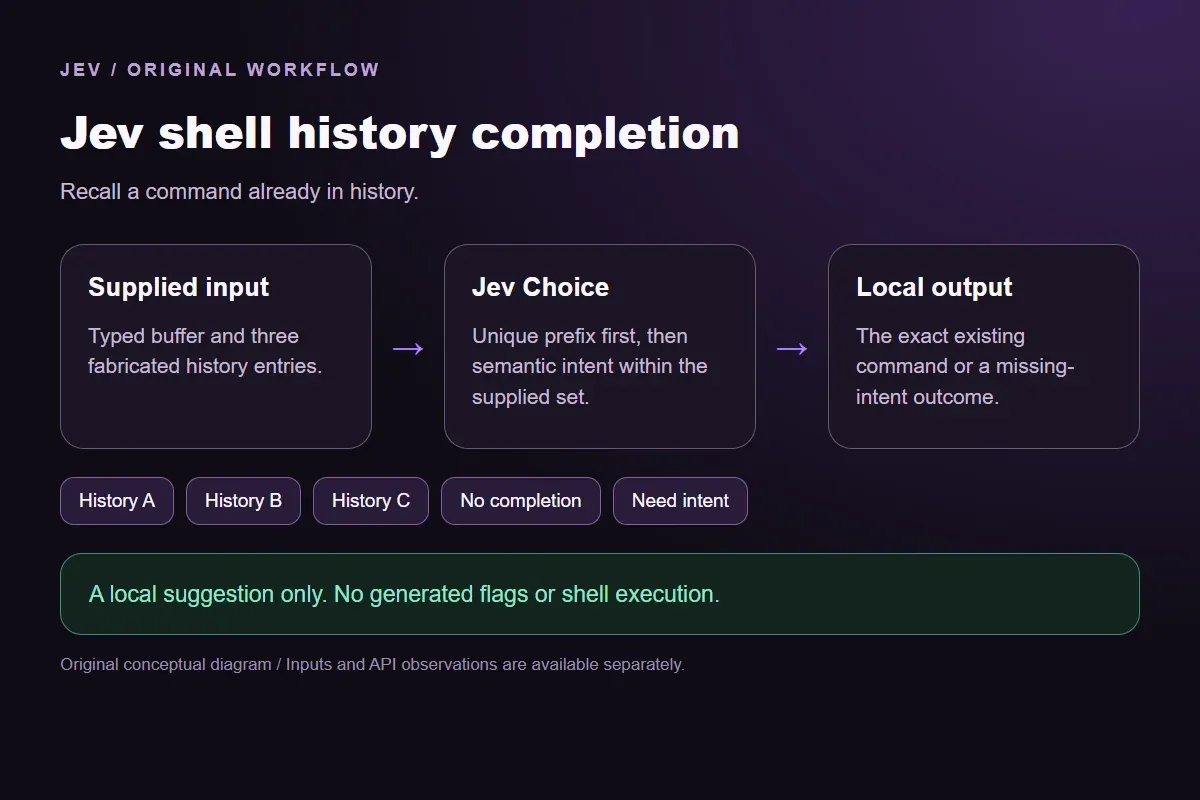
Choose a shell-history entry that completes the current input
Provide the current command buffer and fixed history entries. Select a unique literal-prefix match or an intent match, preserving ambiguity without generating or executing a command.
Recall a command already in history.Live API
The decision
How does Jev shell history completion use the supplied evidence?
Jev shell history completion selects an existing command from an explicitly supplied history. Enter a partial command or describe its purpose in the window. The result binds a history ID to the exact recorded command; it never invents flags, opens a shell or executes the suggestion.
The candidate set contains three original Git history entries. A unique literal prefix takes priority. Otherwise the question asks which entry fits the stated intent. A clear request outside this history receives No completion. An empty buffer or an ambiguous prefix receives Need intent. These outcomes keep an incomplete command from becoming a fabricated suggestion.
An API-collected post about a Jev-powered zsh history plugin inspired the workflow. Its primary repository describes history candidates, prefix and fuzzy modes, and separate acceptance behavior. This page implements a smaller, independent request contract with six authored inputs. It does not install that plugin, copy its implementation or claim its measured typing latency.
Use the history panel as supplied evidence. Changing the buffer asks a new semantic question; changing a candidate changes the available answer. If a real integration reads shell history, exclude credentials and private paths before any request. This demonstration uses fabricated commands with no credentials, personal directory names or production access.
Original workflow illustration. The output is a local preview, not an executed action or source screenshot.
How it works
Try the example in four steps
Use the sample to understand the rule, then test your own input for shell history completion.
01
Add the information to check
Provide the current command buffer and fixed history entries.
02
Confirm the question and labels
Open the decision rules and keep the intended distinction between History A, History B, History C, No completion, Need intent. Edit the choices only when testing your own rule.
03
Run the decision
Use a sample first, then try your own input. Compare the selected label with the other returned probabilities.
04
Review the next step
Review Need intent before using a result. The label is a decision about the supplied information, not an executed action.
Our API test
What the six original inputs returned.
What the six original inputs returned.
Original test input
Fixture expectation
Observed label
Leading probability
Complete a literal prefix
History C
History C
96%
Recall a command by its purpose
History B
History B
99%
Return to a known branch
History A
History A
96%
A command absent from history
No completion
No completion
51%
No typed intent yet
Need intent
Need intent
96%
A prefix shared by all entries
Need intent
Need intent
83%
6 of 6 original fixture expectations matched. Contrary outputs are preserved in the table and downloads; these checks are not held-out accuracy or production suitability.
Measured adapter round trips: 466-1474 ms. Estimated input cost: $0.00002940-$0.00002974 per request. These observations are not a latency guarantee or invoice.
6 actual Jev API calls on October 4, 2026. Original synthetic inputs check this rubric and handoff; they do not establish held-out accuracy. Probabilities are model outputs.Verified
Understand the results
Complete a literal prefix
The first buffer is a literal prefix of the short-status entry.
Read the example notes
Only one supplied command begins with that text, so the explicit rule gives it priority. The output retains the working-tree history ID and the complete recorded command. This is completion of a known entry, not an explanation of Git status or a promise that a repository is clean. A real shell still owns whether and when the user accepts the displayed suggestion.
Recall a command by its purpose
The second input describes a result rather than spelling a command.
Read the example notes
None of the entries starts with that sentence, so the semantic branch compares its intent with the recorded descriptions. The recent-commits candidate already contains the five-entry argument. The model does not generate that argument. If history instead contained a command for ten commits, the consumer could not silently rewrite it to five. Selection preserves the supplied candidate exactly.
The branch-switch sample supplies a named destination that is present in the fixed history
The branch-switch sample supplies a named destination that is present in the fixed history.
Read the example notes
The main-checkout entry is the only candidate with that purpose. The preview does not check whether the branch exists, whether local changes prevent switching or whether the working directory contains a Git repository. Those are execution-time facts outside this request. A UI can display the suggestion while keeping acceptance and any actual repository operation separate.
The deployment request has a clear goal, but none of the three history entries deploys software
The deployment request has a clear goal, but none of the three history entries deploys software.
Read the example notes
No completion prevents the most similar Git entry from becoming a pretend deployment command. This outcome is different from an API failure: the provider returned a valid semantic answer under the stated rule. The local packet has no command payload. A caller must supply a relevant history entry or use another tool rather than execute a loosely related suggestion.
Using the result in your application
An empty buffer contains no usable intent.
Read the example notes
Need intent keeps the result pending without guessing from unrelated history. The sample is intentionally different from the unsupported deployment request: one lacks a goal and the other has a goal absent from the candidate set. The distinction helps a completion interface decide whether to wait for more typing or explain that the available history contains no matching command.
No hidden user preference enters this call.
A prefix shared by all entries
The final buffer is a shared prefix of all three commands.
Read the example notes
This demonstration defines no recency ranking, working-directory hint or preferred activity, so the rule asks for more intent. An actual plugin may have a different ranking policy. Adding that policy requires an explicit contract and new tests. Do not treat the six fixtures as evidence that this smaller example reproduces the source plugin or that every ambiguous terminal input should be handled identically.
Source and example scope
Fixture expectations are authored before the calls. Any contrary model choice remains visible beside its expectation and complete distribution; no repeated judgment is used to obtain a preferred label.
Using the result in your application
Download the exact sample requests and saved observations below.
Read the example notes
Expected labels are original fixture checks and stay outside the request sent to Jev. The observation file preserves the complete probabilities and the hash of each exact request. Editing a task, rubric or candidate requires a fresh response; a matching sample name does not make an older answer current.
Using the result in your application
The JavaScript runner makes one independent SDK request for a chosen sample ID.
Read the example notes
It reads TYPESAFE_API_KEY privately from the environment and has no automatic retry. The Python consumer operates offline: it checks the rubric, labels, unique sample identities, request hashes and valid probability distributions before selecting a fixed local preview. A tied leading result remains pending for review.
Source and example scope
The page reports measured adapter round trips and estimated input cost for the recorded calls.
Read the example notes
Those values describe these requests, not a provider latency guarantee or a billing statement. Six deliberately authored fixtures can check the stated behavior, but they do not establish accuracy on an unseen dataset. Keep disagreements and missing-input examples when testing an integration.
npm install @typesafe-ai/sdk@0.6.0
# Set TYPESAFE_API_KEY privately in your shell.
node run-choice-sample.mjs samples.json literal-prefix
python preview_choice_workflow_v2.py samples.json saved-api-results.json
Runnable offline example
The first request and its recorded local output.
View the code example
Exact first sample and local preview
{
  "input": {
    "task": "Complete the current buffer from the supplied history. The user is still editing; no command has been accepted.",
    "permittedCandidates": {
      "History A": {
        "historyId": "main-checkout",
        "command": "git checkout main",
        "description": "Switch to the existing main branch."
      },
      "History B": {
        "historyId": "recent-commits",
        "command": "git log --oneline -5",
        "description": "Show the last five commits as one-line entries."
      },
      "History C": {
        "historyId": "working-tree",
        "command": "git status --short",
        "description": "Show short working-tree status."
      }
    },
    "currentBuffer": "git st"
  },
  "localOutput": {
    "sampleId": "literal-prefix",
    "leaders": [
      "History C"
    ],
    "probabilities": {
      "History A": 0,
      "History B": 0,
      "History C": 0.96,
      "No completion": 0.02,
      "Need intent": 0.02
    },
    "action": "preview_history_completion",
    "payload": {
      "historyId": "working-tree",
      "command": "git status --short",
      "description": "Show short working-tree status."
    },
    "pending": false
  }
}
Scope of this demo
Where does this decision fit?
Useful with explicit supplied evidence
Complete a typed terminal buffer using only the supplied prior history entries. Separate unique literal completion, semantic recall, absent history and ambiguous intent; bind the exact history command without execution.
Inspecting the original task and a fixed output before integrating external tools.
Comparing an explicit expected label with the complete recorded distribution.
Needs separate implementation or evidence
Inferring facts absent from the supplied input.
Treating a semantic selection as authorization to act.
Executing an external action or generalizing six fixtures into an accuracy claim.
Example FAQ
Questions about this original decision workflow.
Keep relevance, compliance and execution separate.
Does accepting a suggestion execute a command here?
No. This page prints an exact candidate as a local preview. It has no shell connection and cannot execute a command. The source plugin has its own acceptance behavior; review that implementation separately before using it. Selection, acceptance and execution are different steps in an integration.
Can Jev generate a missing command or change its arguments?
This contract forbids both. Jev selects a provided history label. The offline consumer binds that label to the candidate already present in the same validated request. A goal absent from history receives No completion. Edit the candidate set explicitly if your application needs another available command.
Why are blank and unsupported inputs separate?
A blank buffer needs more intent. A deployment goal is understood but unsupported by this history. Keeping separate outcomes lets a UI wait for typing in one case and report a candidate-set limitation in the other. A valid missing-input answer is not a provider outage.
Does the example send my real shell history?
No. The displayed entries are original fabricated examples. The browser sends only the context you submit to the site endpoint. If you edit the window, avoid credentials and private information. A production terminal integration needs its own history filtering, privacy review, stale-response handling and execution controls.
Try a task from your own workflow
Change the supplied task or evidence here, then inspect the live response. Playground supports another explicit decision.