



Jev repeated action check

Check whether a proposed action repeats completed work

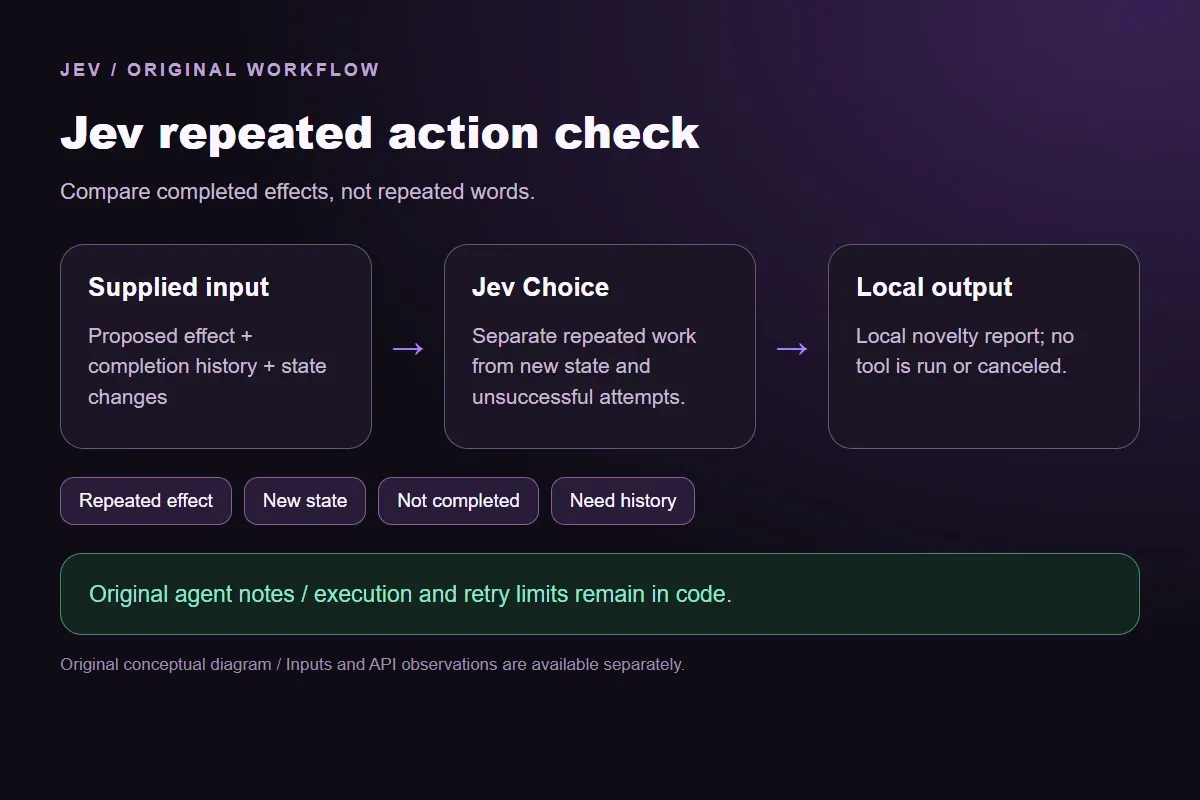
Compare the proposed effect with prior completion and changed state. Separate already-completed work from a needed rerun or an unfinished attempt before deciding what to execute.

Compare completed effects, not repeated words.Live API
Try an example

Original synthetic input. Edit the task or evidence to make a new API request.

Source: Workflow inspiration on X

Source and example scope

The inputs, rubric and preview are original. This window demonstrates the stated decision only; it does not reproduce the source application or its measurements.

Review whether the proposed action repeats a completed effect.

Decision rules and labels
Repeated effectNew stateNot completedNeed history
A real response from the Jev API

Edit any input to explore a different decision. No request is sent until you run it.

Your next decision

Not run yet

Choose an example or write your own input, then run it to see the ranked choices.

Results are not stored by this site. Your submitted text is processed by the API provider.

The decision

How does Jev repeated action check use its evidence?

Jev repeated action check compares the intended effect of a proposed action with completed history before a separate controller decides what to run.

The source describes a Jev decision layer that catches repeated agent actions. Our original notes test semantic repetition without reproducing its agent stack or reported economics. The window makes a real TypeSafe request and the consumer emits only a local novelty report.

Repeated wording and repeated work are different. A redeployment can make another status inspection useful; a failed read has not completed its effect. The supplied history makes those states explicit so the classifier does not infer successful work from an action name alone.

Original Jev repeated action check workflow diagram showing supplied evidence, a typed decision and the local preview.
Original workflow illustration. The output is a local preview, not an executed action or source screenshot.
How it works

Try the example in four steps

Use the sample to understand the rule, then test your own input for repeated-action review.

  1. Illustration of adding the text or evidence for a decision

    Add the information to check

    Compare the proposed effect with prior completion and changed state.

  2. Illustration of defining a question and its allowed choices

    Confirm the question and labels

    Open the decision rules and keep the intended distinction between Repeated effect, New state, Not completed, Need history. Edit the choices only when testing your own rule.

  3. Illustration of sending one input and comparing the returned choices

    Run the decision

    Use a sample first, then try your own input. Compare the selected label with the other returned probabilities.

  4. Illustration of reviewing a result and an uncertain item before using it

    Review the next step

    Review Need history before using a result. The label is a decision about the supplied information, not an executed action.

Our API test

What the six original inputs returned.

What the six original inputs returned.
Original test inputObserved labelLeading probability
A paraphrase of completed workRepeated effect100%
A newly changed inputNew state99%
An earlier unsuccessful attemptNot completed98%
Unavailable completion historyNeed history100%
Different wording for the same effectRepeated effect100%
A genuinely new goalNot completed94%
  • Measured adapter round trips: 483-1247 ms. Estimated input cost: $0.00002171-$0.00002213 per request. These observations are not a latency guarantee or invoice.

6 actual Jev API calls on October 1, 2026. Original synthetic inputs check this rubric and handoff; they do not establish held-out accuracy. Probabilities are model outputs.Verified

Understand the results

The status fixture proposes an effect already completed with no relevant state change

The status fixture proposes an effect already completed with no relevant state change.

Read the example notes

Repeated effect records that redundancy. The report does not stop a live agent or cancel an operation. A controller still needs the actual current history and any requirement to verify status again.

The redeployment fixture uses a similar goal after an explicitly changed state

The redeployment fixture uses a similar goal after an explicitly changed state.

Read the example notes

New state preserves that reason for fresh work. Reusing the prior status result would lose the redeployment evidence. Exact input identities remain necessary even when an operation has the same tool name.

Source and example scope

The failed-read fixture records an attempt that returned no content. Not completed distinguishes an attempted action from a completed effect. The demo does not implement retries or assume that repeated attempts are safe; retry limits and authorization belong to code.

Source and example scope

The unavailable-history fixture cannot establish what was completed. Need history keeps that gap rather than declaring novelty or redundancy. A real application should retrieve a bounded authorized action log and retain successful versus failed outcomes before asking this question.

Source and example scope

The settings fixture paraphrases retrieve and read while referring to the same unchanged document. Repeated effect concerns the meaning and completion state, not an exact string match. This authored example illustrates why action names alone are insufficient, without measuring production loop-detection accuracy.

Source and example scope

The deployment-notes fixture has a different uncompleted goal from the settings read.

Read the example notes

Not completed records that difference. A production controller should validate target identity, side effects, state versions and allowed tool calls separately. The probability report here never grants execution authority or estimates saved costs.

Using the result in your application

Download the exact sample requests and saved observations below.

Read the example notes

Expected labels are original fixture checks and stay outside the request sent to Jev. The observation file preserves the complete probabilities and the hash of each exact request. Editing a task, rubric or candidate requires a fresh response; a matching sample name does not make an older answer current.

Using the result in your application

The JavaScript runner makes one independent SDK request for a chosen sample ID.

Read the example notes

It reads TYPESAFE_API_KEY privately from the environment and has no automatic retry. The Python consumer operates offline: it checks the rubric, labels, unique sample identities, request hashes and valid probability distributions before selecting a fixed local preview. A tied leading result remains pending for review.

Source and example scope

The page reports measured adapter round trips and estimated input cost for the recorded calls.

Read the example notes

Those values describe these requests, not a provider latency guarantee or a billing statement. Six deliberately authored fixtures can check the stated behavior, but they do not establish accuracy on an unseen dataset. Keep disagreements and missing-input examples when testing an integration.

Runnable offline example

Replay one request and inspect the saved preview.

View the code example
Replay commands
npm install @typesafe-ai/sdk@0.6.0
# Set TYPESAFE_API_KEY privately in your shell.
node run-choice-sample.mjs samples.json repeat
python preview_choice_workflow_v2.py samples.json saved-api-results.json
Scope of this demo

Where does this decision fit?

Useful with explicit supplied evidence

  • Compare a proposed action with a supplied completed-action history by intended effect, preserving changed preconditions and unsuccessful attempts. Original harmless agent notes only; no tool executes and no cost saving is claimed.
  • Inspecting the original task and a fixed output before integrating external tools.
  • Comparing an explicit expected label with the complete recorded distribution.

Needs separate implementation or evidence

  • Inferring facts absent from the supplied input.
  • Treating a semantic selection as authorization to act.
  • Executing an external action or generalizing six fixtures into an accuracy claim.
Example FAQ

Questions about this original decision workflow.

Keep relevance, compliance and execution separate.

What does action novelty review compare?

It compares a proposed effect with explicitly supplied successful completion and state-change history.

Is every repeated tool name redundant?

No. Changed relevant state or an uncompleted effect can require new work.

Does the preview stop a running agent?

No. It returns a fixed local novelty report and calls no tool.

How is a failed attempt treated?

Not completed preserves the absence of a successful effect.

Can missing history be assumed empty?

No. Need history retains the missing completion evidence.

Try a task from your own workflow

Change the supplied task or evidence here, then inspect the live response. Playground supports another explicit decision.