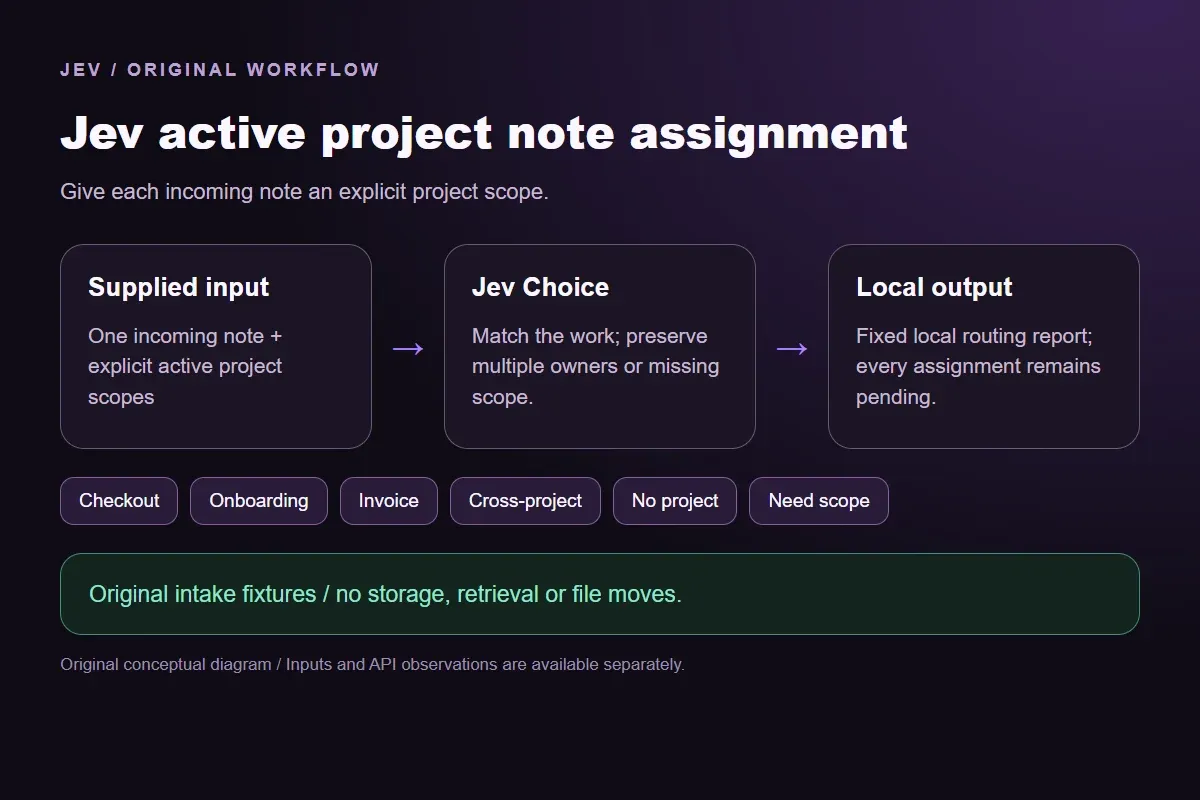




Jev active project note assignment

Route a project note by the deliverable it serves

Compare an incoming note with the active projects' deliverables. Choose checkout, onboarding or invoice work when supported, preserving notes that serve multiple projects or lack enough scope.

Give each incoming note an explicit project scope.Live API
Try an example

Original synthetic input. Edit the task or evidence to make a new API request.

Source: Workflow inspiration on X

Source and example scope

The inputs, rubric and preview are original. This window demonstrates the stated decision only; it does not reproduce the source application or its measurements.

Assign the incoming note using supplied activeProjects and their deliverables.

Decision rules and labels
CheckoutOnboardingInvoiceCross-projectNo projectNeed scope
A real response from the Jev API

Edit any input to explore a different decision. No request is sent until you run it.

Your next decision

Not run yet

Choose an example or write your own input, then run it to see the ranked choices.

Results are not stored by this site. Your submitted text is processed by the API provider.

The decision

How does Jev active project note assignment use active project scopes?

Jev active project note assignment assigns an incoming note to an explicitly supplied active project. The decision concerns the work the note serves, rather than whether its text contains a project name.

The source describes sorting a shared inbox with Jev after supplying active projects and interests. Our original demonstration implements that intake step with three fictional deliverables: checkout accessibility, customer onboarding guidance and invoice reconciliation. Jev returns one of six labels, and code displays a fixed local report. No note is saved, moved or supplied to a writing agent.

Finding an existing note for a task is a different operation. This window starts with one new note and asks which current project should receive it. It also differs from deciding whether information is reusable enough to store. An informative note can be outside all current projects; a useful note can serve two projects without a single owner.

Original Jev active project note assignment workflow diagram showing supplied evidence, a typed decision and the local preview.
Original workflow illustration. The output is a local preview, not an executed action or source screenshot.
How it works

Try the example in four steps

Use the sample to understand the rule, then test your own input for project note routing.

  1. Illustration of adding the text or evidence for a decision

    Add the information to check

    Compare an incoming note with the active projects' deliverables.

  2. Illustration of defining a question and its allowed choices

    Confirm the question and labels

    Open the decision rules and keep the intended distinction between Checkout, Onboarding, Invoice, Cross-project, No project. Edit the choices only when testing your own rule.

  3. Illustration of sending one input and comparing the returned choices

    Run the decision

    Use a sample first, then try your own input. Compare the selected label with the other returned probabilities.

  4. Illustration of reviewing a result and an uncertain item before using it

    Review the next step

    Review Need scope before using a result. The label is a decision about the supplied information, not an executed action.

Our API test

What the six original inputs returned.

What the six original inputs returned.
Original test inputObserved labelLeading probability
A checkout accessibility findingCheckout100%
A first-week setup questionOnboarding100%
A supplier payment mismatchInvoice100%
A note for two deliverablesCross-project99%
An unrelated office noteNo project100%
No project scope suppliedNeed scope92%
  • Measured adapter round trips: 474-1263 ms. Estimated input cost: $0.00002541-$0.00002873 per request. These observations are not a latency guarantee or invoice.

6 actual Jev API calls on October 2, 2026. Original synthetic inputs check this rubric and handoff; they do not establish held-out accuracy. Probabilities are model outputs.Verified

Understand the results

Source and example scope

The keyboard fixture identifies a focus trap in the purchase checkout and gives reproduction steps for the accessibility deliverable.

Read the example notes

Checkout is the candidate project even though the note arrived as a tester message rather than a code issue. The source format does not determine ownership. A real intake system should retain the original note, author and link so the receiving team can inspect the evidence before accepting the work.

A first-week setup question

The setup fixture asks customer education to explain workspace invitations during the first week.

Read the example notes

Onboarding matches the supplied guidance deliverable. It should not become a checkout item merely because new customers may later make purchases. The project descriptions intentionally define the current work more narrowly than a department name. Updating those scopes changes the request and requires a new response rather than reuse of this saved observation.

Source and example scope

The payment fixture concerns supplier account codes and reconciliation records.

Read the example notes

Invoice matches that concrete finance deliverable. The word payment also appears in checkout work, but shared terminology alone does not establish project fit. This synthetic example contains no real supplier records or accounting recommendation. Applications should remove unnecessary sensitive details before classification and use their normal access controls for the source material.

Using the result in your application

The cross-project fixture explicitly requires two equally important corrections: checkout accessibility and the matching account setup guide.

Read the example notes

Cross-project preserves the fact that both deliverables matter. The fixed report has no primary project and remains pending. It does not create duplicate tickets or let the model invent a lead owner. A separate coordination rule or human reviewer must decide how the teams should share that work.

The projector fixture serves facilities work outside all three supplied scopes

The projector fixture serves facilities work outside all three supplied scopes.

Read the example notes

No project means no listed deliverable fits this note. It is not a judgment that the request is unimportant or should be deleted. An organization might keep a separate general inbox or facilities workflow, but neither is implemented here. The local report preserves the boundary of the current project catalog without granting a storage or disposal action.

The last fixture deliberately supplies no project descriptions

The last fixture deliberately supplies no project descriptions.

Read the example notes

Need scope keeps that missing context visible even when the note mentions payment. Jev cannot establish whether the intended work concerns purchases, invoices or guidance from that word alone. This missing-input case differs from a clear outside-scope request. Supply the actual active deliverables in the window and make a fresh request before treating a project assignment as usable.

Using the result in your application

Download the exact sample requests and saved observations below.

Read the example notes

Expected labels are original fixture checks and stay outside the request sent to Jev. The observation file preserves the complete probabilities and the hash of each exact request. Editing a task, rubric or candidate requires a fresh response; a matching sample name does not make an older answer current.

Using the result in your application

The JavaScript runner makes one independent SDK request for a chosen sample ID.

Read the example notes

It reads TYPESAFE_API_KEY privately from the environment and has no automatic retry. The Python consumer operates offline: it checks the rubric, labels, unique sample identities, request hashes and valid probability distributions before selecting a fixed local preview. A tied leading result remains pending for review.

Source and example scope

The page reports measured adapter round trips and estimated input cost for the recorded calls.

Read the example notes

Those values describe these requests, not a provider latency guarantee or a billing statement. Six deliberately authored fixtures can check the stated behavior, but they do not establish accuracy on an unseen dataset. Keep disagreements and missing-input examples when testing an integration.

Runnable offline example

Replay one request and inspect the saved preview.

View the code example
Replay commands
npm install @typesafe-ai/sdk@0.6.0
# Set TYPESAFE_API_KEY privately in your shell.
node run-choice-sample.mjs samples.json keyboard
python preview_choice_workflow_v2.py samples.json saved-api-results.json
Scope of this demo

Where does this decision fit?

Useful with explicit supplied evidence

  • Assign one incoming note to a supplied active project using its deliverable and owner scope. Preserve cross-project notes, unrelated notes and missing project scope. This original intake decision does not retrieve saved notes, decide whether a note is worth saving, create folders or move a file.
  • Inspecting the original task and a fixed output before integrating external tools.
  • Comparing an explicit expected label with the complete recorded distribution.

Needs separate implementation or evidence

  • Inferring facts absent from the supplied input.
  • Treating a semantic selection as authorization to act.
  • Executing an external action or generalizing six fixtures into an accuracy claim.
Example FAQ

Questions about this original decision workflow.

Keep relevance, compliance and execution separate.

Does this window save or move notes?

No. It prints a local routing report. Storage, file paths and access controls require separate application code.

Can a note belong to more than one project?

Yes. Cross-project preserves an explicit multi-project requirement without inventing a primary owner.

How is this different from retrieving a saved note?

The input is one incoming note, and the output is its candidate active project. No archive search or ranking is performed.

Does No project mean the note should be discarded?

No. It means none of the supplied active scopes fits. Retention is a separate decision.

Are these source posts or production measurements?

No. They are six original synthetic inputs with real API observations. They do not reproduce the source archive or establish held-out accuracy.

Try a task from your own workflow

Change the supplied task or evidence here, then inspect the live response. Playground supports another explicit decision.