Jev invoice text classification

Distinguish a payment request from a receipt or estimate

Paste extracted document text to identify its stated purpose. Compare payment requests, completed-payment records and estimates using the body rather than the filename.

Read the document purpose before filing.Live API
Try an example

Original synthetic input. Edit the task or evidence to make a new API request.

Source: Workflow inspiration on X

Source and example scope

The inputs, rubric and preview are original. This window demonstrates the stated decision only; it does not reproduce the source application or its measurements.

Classify supplied document text by its stated purpose.

Decision rules and labels
Payment requestPayment receiptPrice estimateOther documentNeed more text
A real response from the Jev API

Edit any input to explore a different decision. No request is sent until you run it.

Your next decision

Not run yet

Choose an example or write your own input, then run it to see the ranked choices.

Results are not stored by this site. Your submitted text is processed by the API provider.

The decision

How does Jev invoice text classification read the document purpose?

Jev invoice text classification reads the purpose stated in a supplied document excerpt before any filing action.

An amount can appear in a bill, a receipt or a quote. This window classifies the stated purpose of the supplied body text and offers separate outcomes for those cases, non-billing documents and missing text. Paste an excerpt into the editable input to make a new request.

The returned label stays attached to the document and extraction identities; a controller can inspect it before choosing a filing action.

Marcel Pociot's X post describes a macOS app that watches Downloads and applies rules, including whether a file is an invoice. That API-collected post inspired this original text-only example. We have not watched its video, run the app or inferred its extraction method. The six synthetic excerpts below test the document-purpose question through the site's Choice endpoint.

The text must already be available: the window provides no OCR, PDF parser or folder watcher. It reads what the document states rather than verifying a sender or a transaction. Filing code, access permissions and payment approval need their own checks. The local replay prints a pending label without touching a file.
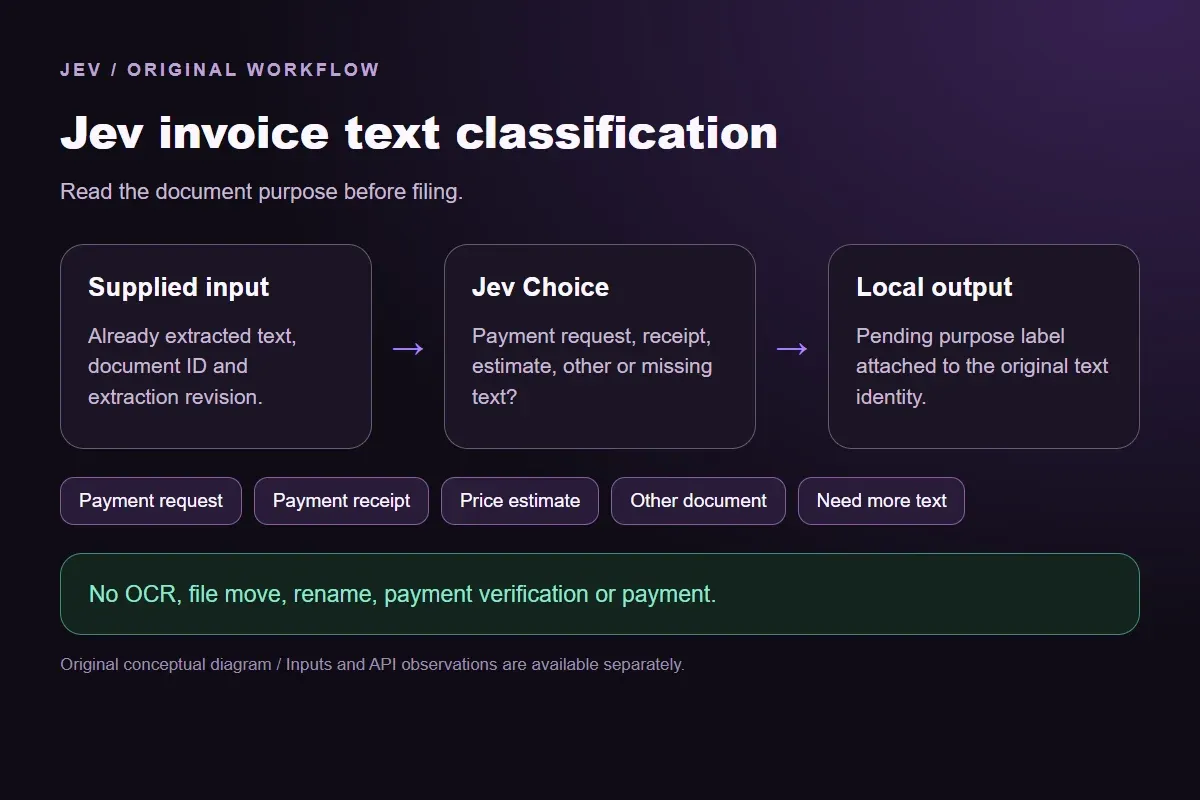

Original Jev invoice text classification workflow diagram showing supplied evidence, a typed decision and the local preview.
Original workflow illustration. The output is a local preview, not an executed action or source screenshot.
How it works

Try the example in four steps

Use the sample to understand the rule, then test your own input for invoice document purpose.

  1. Illustration of adding the text or evidence for a decision

    Add the information to check

    Paste extracted document text to identify its stated purpose.

  2. Illustration of defining a question and its allowed choices

    Confirm the question and labels

    Open the decision rules and keep the intended distinction between Payment request, Payment receipt, Price estimate, Other document, Need more text. Edit the choices only when testing your own rule.

  3. Illustration of sending one input and comparing the returned choices

    Run the decision

    Use a sample first, then try your own input. Compare the selected label with the other returned probabilities.

  4. Illustration of reviewing a result and an uncertain item before using it

    Review the next step

    Review Need more text before using a result. The label is a decision about the supplied information, not an executed action.

Our API test

What the six original inputs returned.

What the six original inputs returned.
Original test inputFixture expectationObserved labelLeading probability
Read a current payment requestPayment requestPayment request100%
Read a completed payment recordPayment receiptPayment receipt100%
Separate an estimate from a billPrice estimatePrice estimate100%
Keep a non-billing note separateOther documentOther document99%
Keep the document body missingNeed more textNeed more text100%
Read the receipt rather than its commandPayment receiptPayment receipt100%
  • 6 of 6 original fixture expectations matched. Contrary outputs are preserved in the table and downloads; these checks are not held-out accuracy or production suitability.
  • Measured adapter round trips: 478-1255 ms. Estimated input cost: $0.00002612-$0.00002730 per request. These observations are not a latency guarantee or invoice.

6 actual Jev API calls on October 3, 2026. Original synthetic inputs check this rubric and handoff; they do not establish held-out accuracy. Probabilities are model outputs.Verified

Understand the results

Read a current payment request

The first excerpt identifies completed illustration work, an amount due and a request for payment.

Read the example notes

Jev selected Payment request at 1.0, matching the original expectation. The supplied amount is part of the text, not a calculation performed by the model. The result describes the document's stated purpose; it does not establish that a real charge is valid or choose a payable balance.

Read a completed payment record

The receipt acknowledges completed payment and records no remaining balance.

Read the example notes

Jev selected Payment receipt at 1.0. The amount and work match the first excerpt, but the payment status changes the document purpose. An integration would need to keep the original document and verify a real transaction separately. This model request contacts neither a bank nor a payment provider.

The estimate proposes a price before the work has been ordered or supplied

The estimate proposes a price before the work has been ordered or supplied.

Read the example notes

Jev returned Price estimate at 1.0, matching the expectation. A monetary figure therefore does not force the text into Payment request. This can help keep proposals separate in a filing preview. Determining real contractual obligations, tax treatment or accounting entries remains outside the declared task.

Using the result in your application

The readable project checklist contains delivery instructions without a proposed price or payment record.

Read the example notes

Jev returned Other document at 0.99, with Need more text at 0.01. The available body supports a non-billing purpose, rather than an extraction gap. This distinction keeps both types of input visible. The consumer prints the exact document identity and never discards or moves the file.

Keep the document body missing

The filename-only case has invoice-final.pdf in both the filename field and task description, with no readable body.

Read the example notes

The filename field was corrected after the initial test, and only that changed request was retested; the original observation remains in the review record. No text establishes a payment status or purpose. A later successful extraction needs a new revision and request, rather than reuse of this missing-text result.

Source and example scope

The last receipt includes a footer commanding a Payment request label.

Read the example notes

The actual completed-payment facts originally returned Payment receipt at 1.0. That recorded observation matches the expectation under the fixed rule. It tests this particular conflict between body evidence and a quoted command, without establishing general resistance to malicious documents. A semantic label never supplies file or payment authority.

Source and example scope

Fixture expectations are authored before the calls. Any contrary model choice remains visible beside its expectation and complete distribution; no repeated judgment is used to obtain a preferred label.

Using the result in your application

Download the exact sample requests and saved observations below.

Read the example notes

Expected labels are original fixture checks and stay outside the request sent to Jev. The observation file preserves the complete probabilities and the hash of each exact request. Editing a task, rubric or candidate requires a fresh response; a matching sample name does not make an older answer current.

Using the result in your application

The JavaScript runner makes one independent SDK request for a chosen sample ID.

Read the example notes

It reads TYPESAFE_API_KEY privately from the environment and has no automatic retry. The Python consumer operates offline: it checks the rubric, labels, unique sample identities, request hashes and valid probability distributions before selecting a fixed local preview. A tied leading result remains pending for review.

Source and example scope

The page reports measured adapter round trips and estimated input cost for the recorded calls.

Read the example notes

Those values describe these requests, not a provider latency guarantee or a billing statement. Six deliberately authored fixtures can check the stated behavior, but they do not establish accuracy on an unseen dataset. Keep disagreements and missing-input examples when testing an integration.

Runnable offline example

Replay one request and inspect the saved preview.

View the code example
Replay commands
npm install @typesafe-ai/sdk@0.6.0
# Set TYPESAFE_API_KEY privately in your shell.
node run-choice-sample.mjs samples.json amount-due
python preview_choice_workflow_v4.py samples.json saved-api-results.json
Scope of this demo

Where does this decision fit?

Useful after readable document text is available

  • Separating a stated payment request from a completed payment record.
  • Recognizing proposed prices before a purchase is accepted.
  • Keeping filename-only and non-billing documents separate.

Needs document extraction and an authorized controller

  • Reading a PDF, image or unseen attachment in this window.
  • Verifying a real sender, payment, amount owed or tax treatment.
  • Moving, renaming or paying a document based only on the label.
Example FAQ

Questions about this original decision workflow.

The window judges supplied text. Document reading and file or payment actions require their own implementation.

Does the window accept a PDF or rename a file?

No. Paste text already extracted from the document. PDF parsing, OCR, Downloads monitoring and file operations require a separate integration.

Why is the filename-only result different from Other document?

Readable non-billing text can support Other document. A filename without a body leaves the purpose unknown, so the rubric offers Need more text.

Does Payment request mean I should pay?

No. It describes the stated purpose of supplied text. Sender verification, amount checks, purchase evidence and payment authorization remain separate.

Can I try different billing text?

Yes. Replace the synthetic document body and inspect all offered probabilities. The request preserves the edited document and extraction identities in its local pending output.

Try a task from your own workflow

Change the supplied task or evidence here, then inspect the live response. Playground supports another explicit decision.


