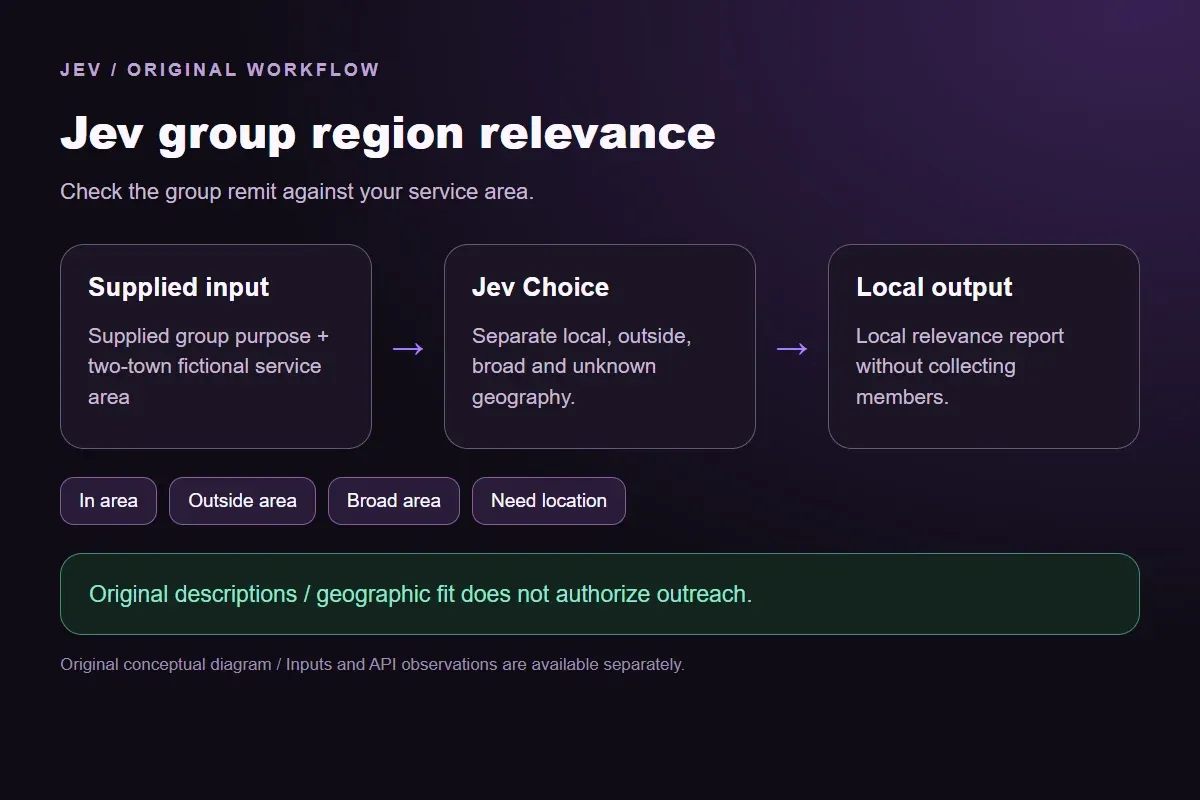




Jev group region relevance

Check whether a group's geographic remit fits your area

Give the group's stated remit and fictional service area. Compare a local fit with another area, broad coverage or an unstated location instead of inferring it from names.

Check the group remit against your service area.Live API
Try an example

Original synthetic input. Edit the task or evidence to make a new API request.

Source: Workflow inspiration on X

Source and example scope

The inputs, rubric and preview are original. This window demonstrates the stated decision only; it does not reproduce the source application or its measurements.

Assess relevance to the fictional service area Brookford and Eastmere.

Decision rules and labels
In areaOutside areaBroad areaNeed location
A real response from the Jev API

Edit any input to explore a different decision. No request is sent until you run it.

Your next decision

Not run yet

Choose an example or write your own input, then run it to see the ranked choices.

Results are not stored by this site. Your submitted text is processed by the API provider.

The decision

How does Jev group region relevance use its evidence?

Jev group region relevance checks a group's stated geographic remit against a supplied service area before it is considered relevant.

The source describes Jev filtering group research for geographic relevance. Our original fictional groups test that specific filter. The window does not search a social network, infer members' locations or reproduce the source's business results.

A place name in an unrelated post is weaker evidence than a group's stated remit. The question makes that distinction explicit. The local report keeps broad communities and unknown scope separate from a local match, so a later researcher can decide what evidence to collect next.

Original Jev group region relevance workflow diagram showing supplied evidence, a typed decision and the local preview.
Original workflow illustration. The output is a local preview, not an executed action or source screenshot.
How it works

Try the example in four steps

Use the sample to understand the rule, then test your own input for group geographic relevance.

  1. Illustration of adding the text or evidence for a decision

    Add the information to check

    Give the group's stated remit and fictional service area.

  2. Illustration of defining a question and its allowed choices

    Confirm the question and labels

    Open the decision rules and keep the intended distinction between In area, Outside area, Broad area, Need location. Edit the choices only when testing your own rule.

  3. Illustration of sending one input and comparing the returned choices

    Run the decision

    Use a sample first, then try your own input. Compare the selected label with the other returned probabilities.

  4. Illustration of reviewing a result and an uncertain item before using it

    Review the next step

    Review Need location before using a result. The label is a decision about the supplied information, not an executed action.

Our API test

What the six original inputs returned.

What the six original inputs returned.
Original test inputObserved labelLeading probability
One covered townIn area95%
A different local areaOutside area100%
A national groupBroad area99%
No geographic remitNeed location100%
A passing place referenceOutside area99%
The second covered townIn area99%
  • Measured adapter round trips: 466-1271 ms. Estimated input cost: $0.00002087-$0.00002146 per request. These observations are not a latency guarantee or invoice.

6 actual Jev API calls on October 1, 2026. Original synthetic inputs check this rubric and handoff; they do not establish held-out accuracy. Probabilities are model outputs.Verified

Understand the results

The Brookford fixture explicitly serves one town in the supplied service area

The Brookford fixture explicitly serves one town in the supplied service area.

Read the example notes

In area records that match. It does not establish lead quality, permission to join or likely buying behavior. A geographic filter can be one research step without turning group membership into a prospect list.

Westhaven is outside the fictional two-town service area

Westhaven is outside the fictional two-town service area.

Read the example notes

The description limits the group to Westhaven, so Outside area preserves that scope. Adding another covered town would change the question and require fresh evaluation. A production integration should retain the area configuration beside each recorded decision.

The national contractor group has a broad remit and no local focus

The national contractor group has a broad remit and no local focus.

Read the example notes

Broad area makes that different from a local community explicitly outside the service area. It remains possible that a local person belongs to the group, but membership is not evidence supplied to this demonstration.

Helpful Neighbors provides no geographic scope

Helpful Neighbors provides no geographic scope. Need location preserves the information gap without inventing a town from the name. A follow-up group description could support a new request. The current preview contains no profile location or inferred audience geography.

The passing-reference fixture mentions a Brookford vacation inside a Westhaven-only group

The passing-reference fixture mentions a Brookford vacation inside a Westhaven-only group.

Read the example notes

The rubric evaluates group remit rather than counting place-name hits. This original check exercises a meaning boundary that a simple keyword filter could miss; six fixtures do not measure how often it occurs in real research.

The second covered town

The Eastmere fixture checks the second explicitly covered town.

Read the example notes

In area should use either configured place, rather than defaulting to the first one. A real geographic filter needs current descriptions, permitted collection, appropriate location granularity and review of ambiguous scope. The output here is a local decision report only.

Using the result in your application

Download the exact sample requests and saved observations below.

Read the example notes

Expected labels are original fixture checks and stay outside the request sent to Jev. The observation file preserves the complete probabilities and the hash of each exact request. Editing a task, rubric or candidate requires a fresh response; a matching sample name does not make an older answer current.

Using the result in your application

The JavaScript runner makes one independent SDK request for a chosen sample ID.

Read the example notes

It reads TYPESAFE_API_KEY privately from the environment and has no automatic retry. The Python consumer operates offline: it checks the rubric, labels, unique sample identities, request hashes and valid probability distributions before selecting a fixed local preview. A tied leading result remains pending for review.

Source and example scope

The page reports measured adapter round trips and estimated input cost for the recorded calls.

Read the example notes

Those values describe these requests, not a provider latency guarantee or a billing statement. Six deliberately authored fixtures can check the stated behavior, but they do not establish accuracy on an unseen dataset. Keep disagreements and missing-input examples when testing an integration.

Runnable offline example

Replay one request and inspect the saved preview.

View the code example
Replay commands
npm install @typesafe-ai/sdk@0.6.0
# Set TYPESAFE_API_KEY privately in your shell.
node run-choice-sample.mjs samples.json local
python preview_choice_workflow_v2.py samples.json saved-api-results.json
Scope of this demo

Where does this decision fit?

Useful with explicit supplied evidence

  • Assess whether a supplied community-group description targets the defined fictional service area, preserving national groups and missing geographic scope. Original descriptions only; no membership data, people or groups are scraped.
  • Inspecting the original task and a fixed output before integrating external tools.
  • Comparing an explicit expected label with the complete recorded distribution.

Needs separate implementation or evidence

  • Inferring facts absent from the supplied input.
  • Treating a semantic selection as authorization to act.
  • Executing an external action or generalizing six fixtures into an accuracy claim.
Example FAQ

Questions about this original decision workflow.

Keep relevance, compliance and execution separate.

What does group region relevance compare?

It compares a supplied group remit with the stated service area, using fictional groups in this example.

Does a mentioned town make a group local?

No. The rubric uses the group's stated geographic purpose; a passing reference does not change it.

Are national groups always outside the area?

The demonstration preserves Broad area as a separate outcome. It does not infer which members are local.

Does the window collect member information?

No. It sends only the original description entered in the window.

Can this result authorize outreach?

No. Geography is separate from consent, membership rules and outreach authorization.

Try a task from your own workflow

Change the supplied task or evidence here, then inspect the live response. Playground supports another explicit decision.