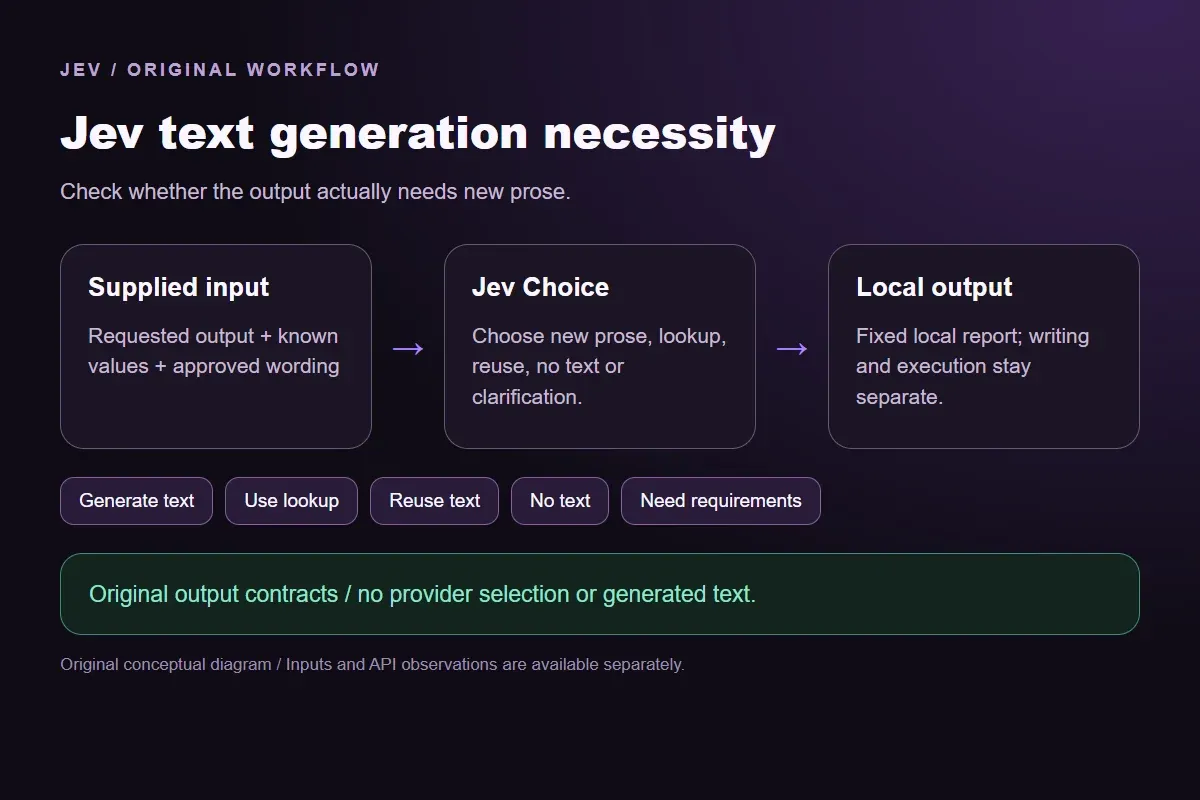




Jev text generation necessity

Check whether a task needs newly generated text

Describe the task, known values, approved wording and output policy. Distinguish fresh prose from an exact lookup, unchanged reusable text or a task needing no text.

Check whether the output actually needs new prose.Live API
Try an example

Original synthetic input. Edit the task or evidence to make a new API request.

Source: Workflow inspiration on X

Source and example scope

The inputs, rubric and preview are original. This window demonstrates the stated decision only; it does not reproduce the source application or its measurements.

Use task, knownValues, approvedText and outputPolicy.

Decision rules and labels
Generate textUse lookupReuse textNo textNeed requirements
A real response from the Jev API

Edit any input to explore a different decision. No request is sent until you run it.

Your next decision

Not run yet

Choose an example or write your own input, then run it to see the ranked choices.

Results are not stored by this site. Your submitted text is processed by the API provider.

The decision

How does Jev text generation necessity use the output contract?

Jev text generation necessity identifies whether a requested output needs original prose, a known value or an existing approved paragraph.

The source describes checking whether an event needs writing before calling a separate writing model. Our implementation turns that one decision into an editable output contract. Jev selects a label from five outcomes; the application prints a fixed local report. It never writes the incident summary or invokes the source's Grok Bot setup.

Knowing an order status is different from composing an explanation of it. Reusing an approved paragraph is also different from rewriting it for a new audience. The examples give those tasks separate labels instead of sending every work item to a text generator. No cost saving, source deployment or production benefit is inferred from this small test.

Original Jev text generation necessity workflow diagram showing supplied evidence, a typed decision and the local preview.
Original workflow illustration. The output is a local preview, not an executed action or source screenshot.
How it works

Try the example in four steps

Use the sample to understand the rule, then test your own input for text-generation need.

  1. Illustration of adding the text or evidence for a decision

    Add the information to check

    Describe the task, known values, approved wording and output policy.

  2. Illustration of defining a question and its allowed choices

    Confirm the question and labels

    Open the decision rules and keep the intended distinction between Generate text, Use lookup, Reuse text, No text, Need requirements. Edit the choices only when testing your own rule.

  3. Illustration of sending one input and comparing the returned choices

    Run the decision

    Use a sample first, then try your own input. Compare the selected label with the other returned probabilities.

  4. Illustration of reviewing a result and an uncertain item before using it

    Review the next step

    Review Need requirements before using a result. The label is a decision about the supplied information, not an executed action.

Our API test

What the six original inputs returned.

What the six original inputs returned.
Original test inputObserved labelLeading probability
A fresh incident summaryGenerate text52%
An exact known statusUse lookup100%
An unchanged approved paragraphReuse text92%
An unspecified outputNeed requirements96%
A completed heartbeatNo text100%
A new version for another audienceGenerate text75%
  • Measured adapter round trips: 464-1178 ms. Estimated input cost: $0.00002726-$0.00002776 per request. These observations are not a latency guarantee or invoice.

6 actual Jev API calls on October 2, 2026. Original synthetic inputs check this rubric and handoff; they do not establish held-out accuracy. Probabilities are model outputs.Verified

Understand the results

The incident-summary fixture requests fresh prose with a stated audience and length

The incident-summary fixture requests fresh prose with a stated audience and length.

Read the example notes

Generate text reports that output requirement. It does not prove that the supplied incident evidence is complete enough to write an accurate summary. A later drafting step must inspect the timeline, resolve contradictions and review the text before anyone uses it. This window tests whether writing is needed, not whether a writing model has already completed the task.

Source and example scope

The status fixture requests an exact value already present in knownValues.

Read the example notes

Use lookup leaves that retrieval to ordinary application code. The model is not used to calculate the status or decide whether the underlying order record is correct. A production application should authorize the lookup and copy the actual value. The offline report names the next step without accessing an account or generating an explanation of its contents.

The support-hours fixture asks for a stored paragraph without changes

The support-hours fixture asks for a stored paragraph without changes.

Read the example notes

Reuse text describes the unchanged approved wording. Its approval is supplied fictional state for this original example, not a real approval by an organization. Applications must establish which version is approved and whether it still suits the audience. If a request changes the wording, scope or audience, the output contract needs a fresh decision rather than reuse of this observation.

The unspecified fixture does not identify a subject, audience or output

The unspecified fixture does not identify a subject, audience or output.

Read the example notes

Need requirements preserves that absence instead of inventing a plausible document. It also stays separate from No text: an unclear request has not established that silence is correct. A user can add a concrete requirement to the window and inspect the new response. The caller remains responsible for deciding which missing details must be obtained before drafting begins.

The heartbeat fixture explicitly requires no textual response after acknowledgment

The heartbeat fixture explicitly requires no textual response after acknowledgment.

Read the example notes

No text follows that supplied policy. It does not discard a real system event or make a general logging decision. Storage, monitoring and operational handling may still be necessary even when no prose should be produced. The local report concerns only the output type and contains no permission to ignore an incident or delete evidence.

Source and example scope

The rewrite fixture changes the audience of an existing technical paragraph.

Read the example notes

Generate text distinguishes that transformation from exact reuse. The model does not perform the rewrite, rate its quality or select a provider. A complete workflow can use this requirement to prepare a separate drafting request with the source paragraph and audience constraints. The resulting draft still needs its own factual and editorial review; this prerequisite decision does not replace that work.

Using the result in your application

Download the exact sample requests and saved observations below.

Read the example notes

Expected labels are original fixture checks and stay outside the request sent to Jev. The observation file preserves the complete probabilities and the hash of each exact request. Editing a task, rubric or candidate requires a fresh response; a matching sample name does not make an older answer current.

Using the result in your application

The JavaScript runner makes one independent SDK request for a chosen sample ID.

Read the example notes

It reads TYPESAFE_API_KEY privately from the environment and has no automatic retry. The Python consumer operates offline: it checks the rubric, labels, unique sample identities, request hashes and valid probability distributions before selecting a fixed local preview. A tied leading result remains pending for review.

Source and example scope

The page reports measured adapter round trips and estimated input cost for the recorded calls.

Read the example notes

Those values describe these requests, not a provider latency guarantee or a billing statement. Six deliberately authored fixtures can check the stated behavior, but they do not establish accuracy on an unseen dataset. Keep disagreements and missing-input examples when testing an integration.

Runnable offline example

Replay one request and inspect the saved preview.

View the code example
Replay commands
npm install @typesafe-ai/sdk@0.6.0
# Set TYPESAFE_API_KEY privately in your shell.
node run-choice-sample.mjs samples.json summary
python preview_choice_workflow_v2.py samples.json saved-api-results.json
Scope of this demo

Where does this decision fit?

Useful with explicit supplied evidence

  • Check whether the requested output requires original prose, an exact lookup, unchanged approved text, no text or additional requirements. This original demonstration selects an output type; it does not select a provider, generate prose, retrieve an account value or send a message.
  • Inspecting the original task and a fixed output before integrating external tools.
  • Comparing an explicit expected label with the complete recorded distribution.

Needs separate implementation or evidence

  • Inferring facts absent from the supplied input.
  • Treating a semantic selection as authorization to act.
  • Executing an external action or generalizing six fixtures into an accuracy claim.
Example FAQ

Questions about this original decision workflow.

Keep relevance, compliance and execution separate.

Does this example generate the requested text?

No. Jev selects the output type, and code displays a local report. Drafting is a separate operation.

How is this different from choosing an LLM?

It asks whether fresh prose is needed at all. No provider, model or reasoning setting is selected.

When is approved text reused?

When the supplied stored paragraph satisfies the requested output unchanged. New wording or a different audience can require a new draft.

Does No text discard the event?

No. It describes the textual output policy only; logging and event handling remain separate.

Do these observations establish savings or accuracy?

No. They are six synthetic functional examples with real API responses, not a production cost study or independent accuracy benchmark.

Try a task from your own workflow

Change the supplied task or evidence here, then inspect the live response. Playground supports another explicit decision.