Jev personal inbox policy

Check whether an email needs a reply under your inbox policy

Give the message, relationship and outstanding obligation. Compare a reply-worthy request with an informational update or promotion, keeping uncertain context for review.

Prioritize the stated obligation, not the urgent wording.Live API
Try an example

Original synthetic input. Edit the task or evidence to make a new API request.

Source: Workflow inspiration on X

Source and example scope

The inputs, rubric and preview are original. This window demonstrates the stated decision only; it does not reproduce the source application or its measurements.

Which disposition follows the supplied inbox policy?

Decision rules and labels
Reply neededInformationalPromotionalReview context
A real response from the Jev API

Edit any input to explore a different decision. No request is sent until you run it.

Your next decision

Not run yet

Choose an example or write your own input, then run it to see the ranked choices.

Results are not stored by this site. Your submitted text is processed by the API provider.

The decision

How does Jev personal inbox policy use the supplied evidence?

Jev personal inbox policy reads a message beside the sender relationship and outstanding obligation. A known colleague waiting for an answer differs from a newsletter demanding immediate attention. Our original fixture supplies those facts explicitly and asks for a fixed disposition. No message is sent, archived, marked read or retrieved from a mailbox.

An API-collected X post discussed personal email priority using knowledge of the sender and whether a response is actually awaited. This exercise adapts that idea to six original messages and an explicit policy. It does not reproduce a source inbox, inspect real contacts or adopt claims about engagement, saved time or message volumes.

Urgent language alone does not create a personal obligation. The promotional sample says last chance but identifies an unsolicited newsletter and no outstanding task. The policy also preserves older unresolved human requests. Recency is not used as a substitute for whether the stated request has been answered.
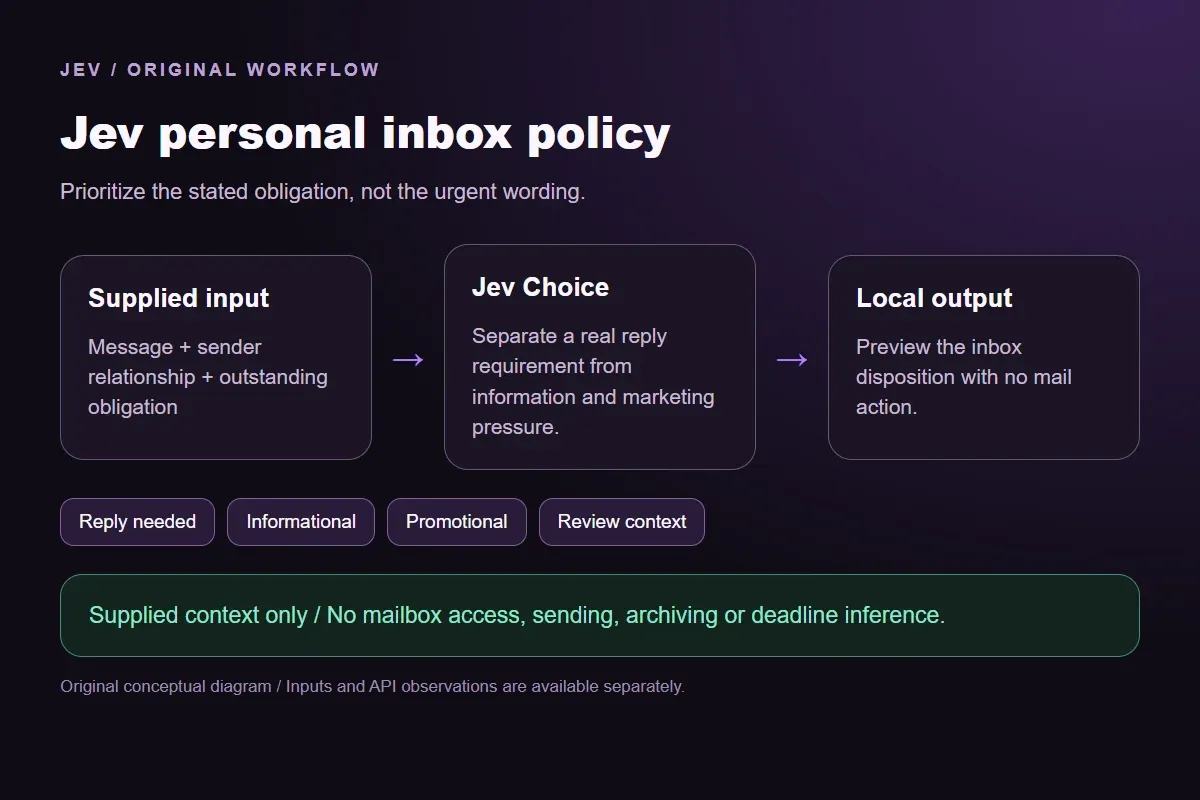

Original Jev personal inbox policy workflow diagram showing supplied evidence, a typed decision and the local preview.
Original workflow illustration. The output is a local preview, not an executed action or source screenshot.
How it works

Try the example in four steps

Use the sample to understand the rule, then test your own input for inbox reply policy.

  1. Illustration of adding the text or evidence for a decision

    Add the information to check

    Give the message, relationship and outstanding obligation.

  2. Illustration of defining a question and its allowed choices

    Confirm the question and labels

    Open the decision rules and keep the intended distinction between Reply needed, Informational, Promotional, Review context. Edit the choices only when testing your own rule.

  3. Illustration of sending one input and comparing the returned choices

    Run the decision

    Use a sample first, then try your own input. Compare the selected label with the other returned probabilities.

  4. Illustration of reviewing a result and an uncertain item before using it

    Review the next step

    Review Reply needed, Review context before using a result. The label is a decision about the supplied information, not an executed action.

Our API test

What the six original inputs returned.

What the six original inputs returned.
Original test inputObserved labelLeading probability
Known colleague awaits a replyReply needed100%
Newsletter pressure without obligationPromotional100%
Relevant update without actionInformational100%
Unknown prior arrangementReview context92%
Outstanding older human replyReply needed97%
Assigned consequential reviewReply needed99%
  • Measured adapter round trips: 523-1324 ms. Estimated input cost: $0.00002335-$0.00002381 per request. These observations are not a latency guarantee or invoice.

6 actual Jev API calls on October 1, 2026. Original synthetic inputs check this rubric and handoff; they do not establish held-out accuracy. Probabilities are model outputs.Verified

Understand the results

The meeting request names a known teammate who is waiting for a response

The meeting request names a known teammate who is waiting for a response.

Read the example notes

Reply needed follows that supplied relationship and open question. The local report contains messageSent false even when the result is clear. A real mail integration must obtain permission, verify the intended account and attach the actual message identity before any action.

The discount newsletter uses pressure without a personal reply requirement

The discount newsletter uses pressure without a personal reply requirement.

Read the example notes

Promotional describes this supplied context; it does not label every commercial email as unimportant. A receipt with a concrete unresolved problem could have a different obligation. Add the actual transaction and requested action rather than asking a model to infer them from a subject line.

The export notice is relevant but requires no reply or further action

The export notice is relevant but requires no reply or further action.

Read the example notes

Informational keeps that distinction visible. The fixed payload is a disposition preview, not a deletion instruction. A production UI can present useful updates separately from messages awaiting the owner, with mailbox state and user corrections kept outside this semantic call.

Prior arrangement without the earlier exchange

The unknown prior-arrangement message says as discussed but omits the earlier exchange and sender relationship.

Read the example notes

Review context is useful because the model cannot establish what the usual action means. The sample deliberately withholds this evidence. A plausible guess about the sender or task is not a replacement for the missing conversation.

An unanswered request and a release obligation

The older colleague request still awaits an answer, while the assigned document review states a concrete release obligation.

Read the example notes

Both are reply-needed fixtures for different reasons. The policy makes these reasons inspectable. It does not calculate deadlines, infer project schedules or measure how much an unread message matters to a real person.

Assigned consequential review

Keep the policy revision, sender-context provenance and final user correction when evaluating a real inbox.

Read the example notes

Our six manually authored messages test the stated boundary and fixed output only. Personal prioritization changes as obligations resolve or relationships change; the same text can need a different answer when its context changes. That update requires a fresh request, not reuse of an earlier score.

Using the result in your application

Download the exact sample requests and saved observations below.

Read the example notes

Expected labels are original fixture checks and stay outside the request sent to Jev. The observation file preserves the complete probabilities and the hash of each exact request. Editing a task, rubric or candidate requires a fresh response; a matching sample name does not make an older answer current.

Using the result in your application

The JavaScript runner makes one independent SDK request for a chosen sample ID.

Read the example notes

It reads TYPESAFE_API_KEY privately from the environment and has no automatic retry. The Python consumer operates offline: it checks the rubric, labels, unique sample identities, request hashes and valid probability distributions before selecting a fixed local preview. A tied leading result remains pending for review.

Source and example scope

The page reports measured adapter round trips and estimated input cost for the recorded calls.

Read the example notes

Those values describe these requests, not a provider latency guarantee or a billing statement. Six deliberately authored fixtures can check the stated behavior, but they do not establish accuracy on an unseen dataset. Keep disagreements and missing-input examples when testing an integration.

Runnable offline example

Replay one request and inspect the saved preview.

View the code example
Replay commands
npm install @typesafe-ai/sdk@0.6.0
# Set TYPESAFE_API_KEY privately in your shell.
node run-choice-sample.mjs samples.json human
python preview_choice_workflow_v2.py samples.json saved-api-results.json
Scope of this demo

Where does this decision fit?

Useful with explicit supplied evidence

  • Apply an explicit personal inbox policy to original sender and message context, separating an outstanding human reply or concrete obligation from information and marketing pressure. Preserve missing relationship or obligation evidence. The local disposition never sends, archives or marks a message read.
  • Inspecting the original task and a fixed output before integrating external tools.
  • Comparing an explicit expected label with the complete recorded distribution.

Needs separate implementation or evidence

  • Inferring facts absent from the supplied input.
  • Treating a semantic selection as authorization to act.
  • Executing an external action or generalizing six fixtures into an accuracy claim.
Example FAQ

Questions about this original decision workflow.

Keep relevance, compliance and execution separate.

Does this connect to my inbox?

No. The window sends the text and explicit context you enter to the server-side Jev endpoint. It does not access a mailbox, contacts or message history.

Does urgent wording always receive priority?

No. This policy uses the supplied relationship and outstanding obligation. An unsolicited newsletter with no personal obligation is promotional even when its wording is urgent.

Can an older message still need a reply?

Yes. An explicitly unresolved human request remains Reply needed here. The policy does not rank messages by age or calculate a deadline.

What happens when prior context is absent?

Review context retains the missing relationship, requested action or obligation evidence. The model should not invent the earlier conversation.

Will the preview send or archive a message?

No. Every fixed payload keeps messageSent and messageArchived false. Actual mail operations require a separate authorized integration.

Try a task from your own workflow

Change the supplied task or evidence here, then inspect the live response. Playground supports another explicit decision.


