Jev browser control selection

Jev browser control selection. Find the control that matches the goal.

Jev browser control selection: Match a navigation request to a supplied control. Inspect its exact ID and destination before adding a separately authorized browser action.

Find the control that matches the goal.Live API
Try an example

Original synthetic input. Edit the task or evidence to make a new API request.

Source: Workflow inspiration on X. The inputs, rubric and preview are original. This window demonstrates the stated decision only; it does not reproduce the source application or its measurements.

Pricing linkDocumentation linkContact linkNo available controlNeed more context
A real response from the Jev API

Edit any input to explore a different decision. No request is sent until you run it.

Your next decision

Not run yet

Choose an example or write your own input, then run it to see the ranked choices.

Results are not stored by this site. Your submitted text is processed by the API provider.

The decision

How does Jev browser control selection use the supplied evidence?

Jev browser control selection matches a user's navigation goal to a control in a supplied snapshot. Our original fixture contains three links: plan information, API documentation and contact support. The model selects a label. The offline consumer returns the corresponding element ID and href from the local fixture, so the destination is inspectable without clicking it.

A phrase such as read the API setup may differ from the visible label API documentation. That semantic match is the task here. The href and elementId have a different role: they preserve which control the application actually observed. A fluent destination description cannot create a fourth element or authorize a purchase that the snapshot never offered.

An API-collected X post about Jev selecting browser actions inspired the example. We read related maintainer repositories to understand where their extraction and execution loops sit. This page tests a single text decision over a synthetic snapshot. It does not run Browser Use, connect to your tabs, observe screenshots or reproduce the post's timing and cost comparisons.

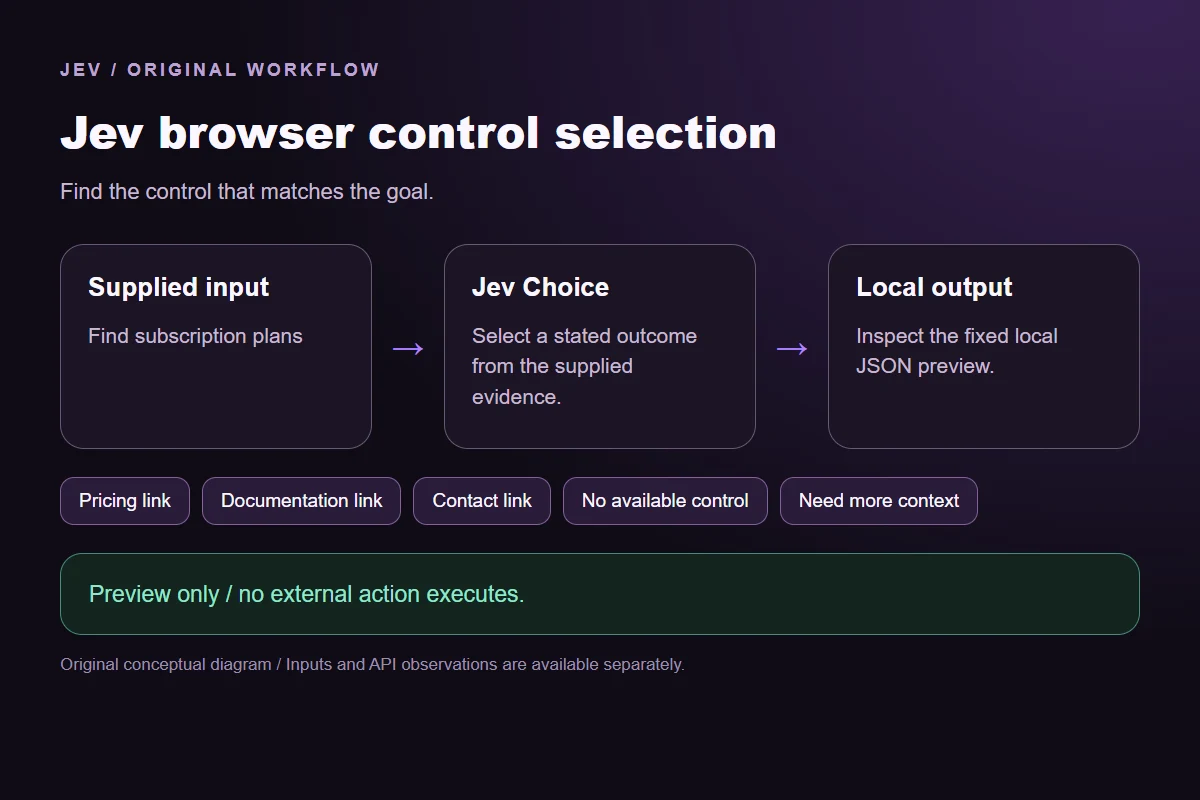
Original Jev browser control selection workflow diagram showing supplied evidence, a typed decision and the local preview.
Original workflow illustration. The output is a local preview, not an executed action or source screenshot.
How it works

Inspect the decision in four steps.

Keep the evidence and the returned output attached to the same request.

  1. Supply the actual task

    Open the page explaining plan prices. The model sees this original task and the provided evidence.

  2. Define the permitted outcomes

    Use the explicit rubric in the window. Every label has a stated meaning; missing evidence cannot create an unavailable action.

  3. Inspect the complete response

    Compare all offered probabilities and preserve the actual leading choice. A provider failure is separate from a semantic no-match or review outcome.

  4. Preview the local handoff

    Replay the saved observations with the offline consumer. The mapped JSON stays local and no external action executes.

Our API test

What the six original inputs returned.

What the six original inputs returned.
Original test inputObserved labelLeading probability
Find subscription plansPricing link100%
Read API setupDocumentation link100%
Reach supportContact link100%
Unavailable account pageNo available control100%
Unavailable purchase actionNo available control100%
Unspecified destinationNeed more context99%
  • Measured adapter round trips: 488-1320 ms. Estimated input cost: $0.00002940-$0.00002974 per request. These observations are not a latency guarantee or invoice.

6 actual Jev API calls on October 1, 2026. Original synthetic inputs check this rubric and handoff; they do not establish held-out accuracy. Probabilities are model outputs.Verified

Worked example

How can you reproduce this decision and inspect its output?

The three matched samples ask for different destinations while keeping the snapshot fixed. You can inspect the plan link's href next to the recorded choice, then compare the documentation task. The fixture uses demo.example deliberately: it is illustrative data, not a destination this consumer visits. These identifiers belong to the local snapshot only.

The account-settings sample is a clear goal with no supplied match. The purchase request is also unsupported: opening plan information is not the same action as buying a plan. A browser controller should not turn a navigation candidate into a transaction merely because the words are related. No available control preserves that boundary.

The unspecified destination has a different problem. The snapshot may contain the right page, but the request gives no basis for choosing it. Need more context lets the application ask for the intended destination. Do not treat a high probability on a popular navigation item as evidence of a user's missing intention.

A real DOM snapshot must be collected separately. The maintainer examples extract controls and keep their identities alongside the offered labels. Our fixture starts after that step. It does not establish whether extraction included a hidden menu, an iframe, a disabled button or a control represented only by a picture. Test those cases in the browser adapter you intend to use.

Snapshot freshness matters after a response too. A page can navigate or replace an element while an API request is pending. The saved-result hash binds the answer to the text snapshot; it does not prove the live DOM still has that element. A real executor needs to recheck the page identity, allowed origin and current control state before performing the separately authorized action.

Try changing the navigation goal to request a support form while leaving all three links intact. Then compare a goal asking to change the account password. That second request requires a control outside this inventory. Preserve both outcomes in a new test set. The purpose is to inspect target selection, not to demonstrate complete end-to-end browser automation.

Download the exact sample requests and saved observations below. Expected labels are original fixture checks and stay outside the request sent to Jev. The observation file preserves the complete probabilities and the hash of each exact request. Editing a task, rubric or candidate requires a fresh response; a matching sample name does not make an older answer current.

The JavaScript runner makes one independent SDK request for a chosen sample ID. It reads TYPESAFE_API_KEY privately from the environment and has no automatic retry. The Python consumer operates offline: it checks the rubric, labels, unique sample identities, request hashes and valid probability distributions before selecting a fixed local preview. A tied leading result remains pending for review.

The page reports measured adapter round trips and estimated input cost for the recorded calls. Those values describe these requests, not a provider latency guarantee or a billing statement. Six deliberately authored fixtures can check the stated behavior, but they do not establish accuracy on an unseen dataset. Keep disagreements and missing-input examples when testing an integration.

Exact sample requests

Saved API observations

Single-request SDK runner

Offline preview consumer

Try another decision in Playground

Compare the example directory

Read the Jev model overview
Runnable offline example

Replay one request and inspect the saved preview.

Replay commands
npm install @typesafe-ai/[email protected]
# Set TYPESAFE_API_KEY privately in your shell.
node run-choice-sample.mjs samples.json price
python preview_choice_workflow_v2.py samples.json saved-api-results.json
Scope of this demo

Where does this decision fit?

Useful with explicit supplied evidence

  • Select one supplied enabled browser control for a specific navigation goal, and preview its original element ID and href without opening or clicking a live site. Exact fixture: task asks plan prices, e-price links to https://demo.example/pricing; API label Pricing link maps to the locally supplied element ID, role, label, href and enabled flag. The v2 offline consumer checks request hash and payload equality. Account destination absent and purchase action unavailable have no-match; missing destination needs context. Six explicit fixture cases below make the output semantics reconstructable. Revised rubric asks which control directly serves the whole requested task. It explicitly forbids intermediate navigation for a transaction; the first ambiguous question and its contrary purchase result remain preserved.
  • Inspecting the original task and a fixed output before integrating external tools.
  • Comparing an explicit expected label with the complete recorded distribution.

Needs separate implementation or evidence

  • Inferring facts absent from the supplied input.
  • Treating a semantic selection as authorization to act.
  • Executing an external action or generalizing six fixtures into an accuracy claim.
Example FAQ

Questions about this original decision workflow.

Keep relevance, compliance and execution separate.

Does this demo access my browser tabs?

No. The window sends the text you supply to the site's server-side Jev endpoint. Its original fixture is a JSON snapshot with three synthetic controls. The downloaded preview does not attach to a browser or navigate to the stored hrefs.

Can Jev invent a CSS selector here?

No. Its Choice output comes from the supplied labels. The local preview returns an original elementId and href from the fixture. A browser adapter still needs its own validated mapping from that identity to a live control.

Why is buying a plan unsupported?

The available control opens plan information. It is not a checkout or purchase action. This fixture has no transaction candidate, so a matching topic cannot authorize a different operation.

What if the live page changes during the call?

The answer describes the supplied snapshot. A controller should verify the current page and target before acting, and obtain a new decision when relevant evidence changes. The recorded hash alone cannot prove live DOM freshness.

Do the six results establish browser-agent accuracy?

They check selection over this original three-link snapshot. They do not test extraction, navigation, authentication, text entry or recovery from page changes. Those components require separate end-to-end tests on authorized sites.

Which target should a controller consume when Jev answers several action questions?

Consume the target belonging to the selected operation. A target proposed for typing does not become a click target because both appear in the same response. The Jev Ultrafast maintainer rules describe this handoff. Our three-link fixture offers navigation controls only, so it does not test operation-specific target heads.

Does a DONE answer prove that the goal was completed?

A DONE answer is a decision to stop. The executor still needs an independent check of the requested outcome. For example, a flight search needs evidence that the requested route and date are visible. This page previews a supplied link choice and does not perform that browser check.

Try a task from your own workflow

Change the supplied task or evidence here, then inspect the live response. Playground supports another explicit decision.